07 AirCAMERA_1030
作者:王城钧 | 最后修改:2026-10-16
一、概述
AirCAMERA _1030 是合宙推出的一款 USB 接口的摄像头的配件板,其中:
- 驱动 IC:KC6089-V.0,USB-OV2720;
- 200 万像素静态拍照;
- 100 万像素录像;
- 适用于 Air8101 系列模组;
二、演示模块概述
本示例主要是展示 AirCAMERA_1030 的使用,
本地拍摄照片后通过 httpplus 扩展库将图片上传至 https://www.air32.cn/upload/jpg/
本地录制视频后通过 httpplus 扩展库将视频上传至 https://www.air32.cn/upload/mp4/
rtmp 推流后通过合宙音视频后台查看 https://video.luatos.com/login?redirect=/real-time
1、main.lua:主程序入口
2、take_photo_http_post.lua:执行拍照后上传照片至 https://www.air32.cn/upload/jpg/
3、netdrv_wifi.lua:连接 WIFI
4、video_http_post.lua:执行录像后上传至 https://www.air32.cn/upload/mp4/
5、rtmp_app.lua:执行 rtmp 推流至 https://video.luatos.com
注意事项:
1、如用 V1006 版本固件,请使用 2 号固件
2、rtmp 推流必须使用 V2008 及以上版本固件
3、仅支持 2.4G 的 WiFi,不支持 5G 的 WiFi
4、因为Air32.com平台已经不开放使用了,所以该DEMO仅作上传照片至服务器的演示作用,使用时请将上传URL修改为您自己的服务器地址,或者通过excloud扩展库上传到合宙IOT平台uploadtest.luatos.com
三、演示功能概述
1、主程序入口模块(main.lua)
- 初始化项目信息和版本号
- 初始化看门狗,并定时喂狗
- 启动一个循环定时器,每隔 3 秒钟打印一次总内存,实时的已使用内存,历史最高的已使用内存情况方便分析内存使用是否有异常
- 加载 netdrv_wifi 模块(通过 require "netdrv_wifi")
- 加载 take_photo_http_post 模块(通过 require "take_photo_http_post")或 加载 video_http_post 模块(通过 require "video_http_post")或加载 rtmp_app 模块(通过 require "rtmp_app ") 注意:以上模块只能三选一进行使用
2、WIFI 连接模块(netdrv_wifi.lua)
- 订阅"IP_READY"和"IP_LOSE"
- 根据对应的网络状态执行对应的动作
- 联网成功则配置 DNS
- 联网失败则打印联网失败日志
3、拍照上传业务模块(take_photo_http_post.lua)
- 订阅 IP_READY 信息,确认联网后执行拍照上传任务
- 每 30 秒触发一次拍照:AirCAMERA_1030_func()
- 每 3 秒打印一次系统和 LUA 的内存信息:memory_check()
- 配置摄像头信息表:usb_camera_param
- 初始化摄像头:excamera.open()
- 执行拍照:excamera.photo()
- 上传照片:httpplus.request()
- 关闭摄像头:excamera.close()
4、录像上传核心业务模块(video_http_post.lua)
- 订阅 IP_READY 信息,确认联网后执行录像上传任务
- 挂载 TF 卡 :系统启动时调用 mount_tf_card() 函数挂载 TF 卡
- 循环轮切摄像头 :video_cycle_func() 函数循环触发每个摄像头的视频录制
- 等待视频上传完成 :触发摄像头后,等待 VIDEO_UPLOAD_DONE 事件
- 配置摄像头信息表 :usb_camera_param
- 初始化摄像头 :excamera.open()
- 录制 30 秒 MP4 视频 :excamera.video()
- 关闭摄像头 :excamera.close()
- 上传视频 :httpplus.request() 将视频上传到服务器
- 发送上传完成事件 :上传完成后发布 VIDEO_UPLOAD_DONE 事件
- 每 10 秒打印一次系统和 Lua 的内存信息 :memory_check()
5、RTMP 推流业务模块(rtmp_app.lua)
-
订阅 IP_READY 信息 , 确认联网后执行 RTMP 推流任务
-
获取 RTMP 推流地址:通过 http.request()请求从服务器获取推流地址
-
初始化摄像头 :excamera.open()初始化 USB 摄像头
-
RTMP 推流 :excamera.rtmp()确保摄像头状态正常,然后 rtmpc:start()开始推流逻辑
-
监控推流状态 :循环监控推流过程,每 20 秒打印一次内存信息
-
处理异常情况 :推流异常时发送 RECONNECT_RTMP 信息,然后根据重连函数进行重连
-
释放资源 :推流结束时 excamera.close()关闭摄像头,释放资源
6、拍照上传业务模块(photo_to_aircloud.lua)
-
订阅 IP_READY 信息,确认联网后执行拍照上传任务
-
每 30 秒触发一次拍照:AirCAMERA_1030_func()
-
每 3 秒打印一次系统和 LUA 的内存信息:memory_check()
-
配置摄像头信息表:usb_camera_param
-
初始化摄像头:excamera.open()
-
执行拍照:excamera.photo()
-
上传照片:httpplus.request()
-
关闭摄像头:excamera.close()
四、准备硬件环境
4.1 拍照上传硬件环境:
1、Air8101 核心板一块
2、TYPE-C USB 数据线一根
3、合宙标准配件 AirCAMERA_1030 一块
4、Air8101 核心板和合宙标准配件 AirCAMERA_1030 的硬件接线方式为
Air8101 核心板通过 TYPE-C USB 口供电;(背面功耗测试开关拨到 OFF)
TYPE-C USB 数据线直接插到核心板的 TYPE-C USB 座子,另外一端连接电脑 USB 口;
AirCAMERA_1030 配件板 + Air8101 核心板,硬件连接示意图:
单路摄像头链接方式

四路摄像头链接方式 如图所示,将四路 USB 摄像头接入 HUB 中,然后将 HUB 通过 USB 口连接到 Air8101 核心板上;

4.2 录像上传硬件环境:
1、Air8101 核心板一块
2、TYPE-C USB 数据线一根
3、合宙标准配件 AirCAMERA_1030 + AirMICROSD_1000 配件板 各一块
4、Air8101 核心板和合宙标准配件 AirCAMERA_1030 的硬件接线方式为
Air8101 核心板通过 TYPE-C USB 口供电;(背面功耗测试开关拨到 OFF)
Air8101 核心板正面的 5V/3.3V 拨动开关,拨到 5V 的一端
TYPE-C USB 数据线直接插到核心板的 TYPE-C USB 座子,另外一端连接电脑 USB 口;
AirMICROSD_1000 配件板与 Air8101 核心板连接说明:

单路摄像头链接方式

四路摄像头链接方式
此方式下需要将 8101 核心板上的拨码开关拨动到 5V 供电
如图所示,将四路 USB 摄像头接入 HUB 中,然后将 HUB 通过 USB 口连接到 Air8101 核心板上;

4.3 rtmp 推流硬件环境:
1、Air8101 核心板一块
2、TYPE-C USB 数据线一根
3、合宙标准配件 AirCAMERA_1030 配件板 一块
4、Air8101 核心板和合宙标准配件 AirCAMERA_1030 的硬件接线方式为
Air8101 核心板通过 TYPE-C USB 口供电;(背面功耗测试开关拨到 OFF)
TYPE-C USB 数据线直接插到核心板的 TYPE-C USB 座子,另外一端连接电脑 USB 口;
AirCAMERA_1030 配件板与 Air8101 核心板连接说明:
将 AirCAMERA_1030 配件板 直接接入 Air8101 核心板 的 USB 接口即可
AirCAMERA_1030 配件板 + AirMICROSD_1000 配件板 + Air8101 核心板,硬件连接示意图:

Air8101 核心板购买链接:Air8101 核心板 WiFi 4G 以太网 蓝牙 720P显示屏 200万拍照-淘宝网
AirCAMERA_1030 购买链接:AirCAMERA_1030 200万像素拍照 100万录像 USB摄像头-淘宝网
五、准备软件环境
5.1 软件环境
在开始实践本示例之前,先筹备一下软件环境:
1、烧录工具:Luatools 下载调试工具
2、本demo开发测试时使用的固件为Air8101 V2010 版本固件,本demo对固件版本没有什么特殊要求,所以你如果要测试本demo时,可以直接使用最新版本的内核固件;如果发现最新版本的内核固件测试有问题,可以使用我们开发本demo时使用的内核固件版本来对比测试;
3、脚本文件:https://gitee.com/openLuat/LuatOS/tree/master/module/Air8101/demo/accessory_board/AirCAMERA_1030
4、lib 脚本文件:使用 Luatools 烧录时,勾选 添加默认 lib 选项,使用默认 lib 脚本文件
准备好软件环境之后,接下来查看 Air8101 核心板使用说明,将本篇文章中演示使用的项目文件烧录到 Air8101 核心板中
5.2 API 介绍
excamera 扩展库:https://docs.openluat.com/osapi/ext/excamera/
5.3 合宙音视频后台环境
注意:进行 rtmp 推流前,需按下列步骤提前搭建 rtmp 推流环境。
1、打开合宙视频物联网大数据平台 输入自己的 IOT 账号和密码然后输入验证码,勾选上外部用户,点击登录

2、点击最上方系统,选择录像机,点击新增
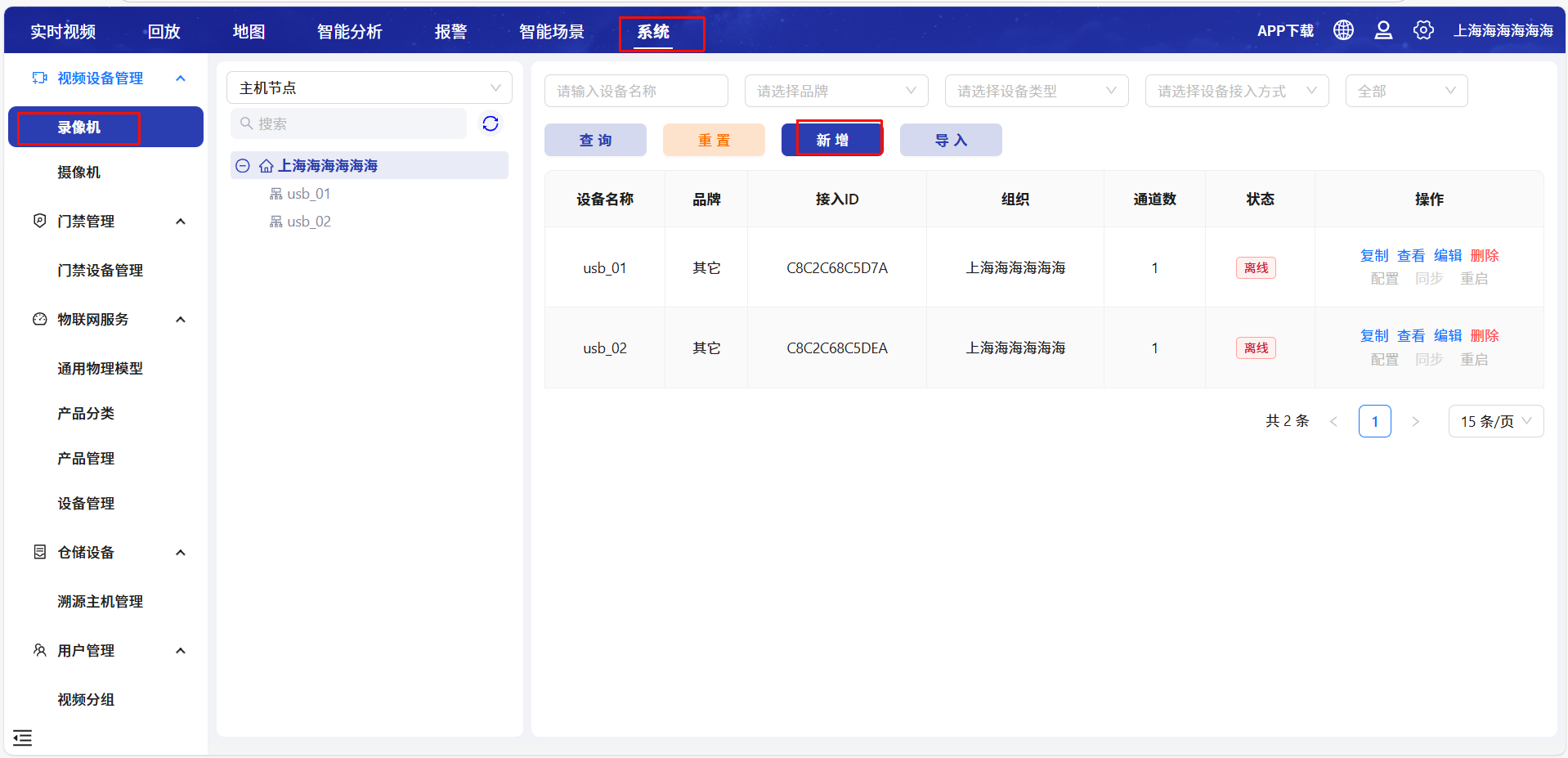
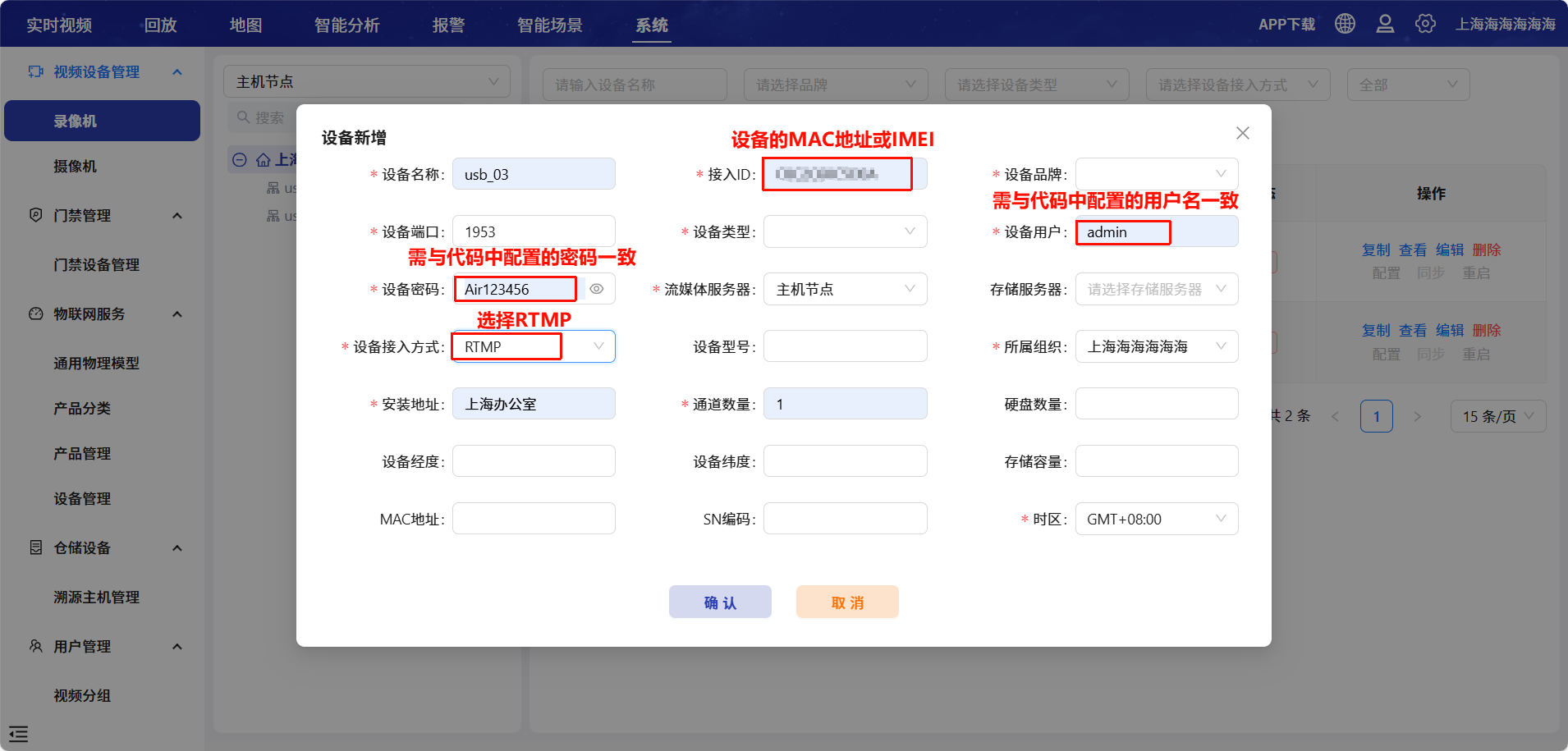
3、按照下图给出提示进行配置,配置完成点击确认即可
六、程序结构
AirCAMERA_1030/
│── main.lua
│── netdrv_wifi.lua
│── take_photo_http_post.lua
│── video_http_post.lua
│── rtmp_app.lua
│── readme.md
6.1 文件说明
main.lua:主程序入口文件。netdrv_wifi.lua:连接 WIFI。take_photo_http_post.lua:执行拍照后上传照片至 https://www.air32.cn/upload/jpg/。video_http_post.lua:执行录像后上传照片至 https://www.air32.cn/upload/mp4/。rtmp_app.lua:执行 rtmp 推流至 https://video.luatos.com/login?redirect=/real-time。
七、代码详解
7.1 main.lua
主程序文件 main.lua 是整个项目的入口点。它负责初始化系统环境。
7.2 netdrv_wifi.lua
本文件为 WIFI STA 网卡驱动模块,核心业务逻辑为:
1、初始化 WIFI 网络;
2、连接 WIFI 路由器;
3、和 WIFI 路由器之间的连接状态发生变化时,在日志中进行打印;
local exnetif = require "exnetif"

local function ip_ready_func(ip, adapter)
    if adapter == socket.LWIP_STA then
        -- 在位置1和2设置自定义的DNS服务器ip地址:
        -- "223.5.5.5",这个DNS服务器IP地址是阿里云提供的DNS服务器IP地址;
        -- "114.114.114.114",这个DNS服务器IP地址是国内通用的DNS服务器IP地址;
        -- 可以加上以下两行代码,在自动获取的DNS服务器工作不稳定的情况下,这两个新增的DNS服务器会使DNS服务更加稳定可靠;
        -- 如果使用专网卡,不要使用这两行代码;
        -- 如果使用国外的网络,不要使用这两行代码;
        socket.setDNS(adapter, 1, "223.5.5.5")
        socket.setDNS(adapter, 2, "114.114.114.114")

        log.info("netdrv_wifi.ip_ready_func", "IP_READY", socket.localIP(socket.LWIP_STA))
    end
end

local function ip_lose_func(adapter)
    if adapter == socket.LWIP_STA then
        log.warn("netdrv_wifi.ip_lose_func", "IP_LOSE")
    end
end


--WIFI联网成功(作为STATION成功连接AP,并且获取到了IP地址)后,内核固件会产生一个"IP_READY"消息
--各个功能模块可以订阅"IP_READY"消息实时处理WIFI联网成功的事件
--也可以在任何时刻调用socket.adapter(socket.LWIP_STA)来获取WIFI网络是否连接成功

--WIFI断网后,内核固件会产生一个"IP_LOSE"消息
--各个功能模块可以订阅"IP_LOSE"消息实时处理WIFI断网的事件
--也可以在任何时刻调用socket.adapter(socket.LWIP_STA)来获取WIFI网络是否连接成功

--此处订阅"IP_READY"和"IP_LOSE"两种消息
--在消息的处理函数中,仅仅打印了一些信息,便于实时观察WIFI的连接状态
--也可以根据自己的项目需求,在消息处理函数中增加自己的业务逻辑控制,例如可以在连网状态发生改变时更新网络图标
sys.subscribe("IP_READY", ip_ready_func)
sys.subscribe("IP_LOSE", ip_lose_func)


-- 配置WiFi设备模式的单网卡,exnetif.set_priority_order使用的网卡编号为socket.LWIP_STA
-- ssid为要连接的WiFi路由器名称;
-- password为要连接的WiFi路由器密码;
-- 注意:仅支持2.4G的WiFi,不支持5G的WiFi;
-- 实际测试时,根据自己要连接的WiFi热点信息修改以下参数
exnetif.set_priority_order({
    {
        WIFI = {
            ssid = "A上海合宙通讯",
            password = "HZ88888888"
        }
    }
})
7.3 take_photo_http_post.lua
系统通过轮切任务循环触发单个 AirCAMERA_1030 摄像头,该摄像头收到触发事件后,先初始化配置,执行拍照操作并保存到 RAM,待网络就绪后上传到服务器,上传完成删除本地文件,关闭摄像头释放资源,轮切任务继续循环触发该摄像头,如此往复。
因为Air32.com平台已经不开放使用了,所以该DEMO仅作上传照片至服务器的演示作用,使用时请将上传URL修改为您自己的服务器地址,或者通过excloud扩展库上传到合宙IOT平台uploadtest.luatos.com
-- 功能:提供摄像头初始化、拍照和资源管理功能
-- 引入excamera扩展库模块
local excamera = require "excamera"
-- 引入httpplus扩展库模块
local httpplus = require "httpplus"

-- 定义照片保存方式,有三种类型:
-- 1、ZBUFF保存,输入"ZBUFF"即可,excamera库会自动处理ZBUFF
-- 2、保存到内存文件系统中,路径名需指向/ram/文件夹
-- 3、保存到内置FLASH文件系统中
-- 选择其中一个即可,注释另两个路径变量
local save_method = "ZBUFF"
-- local save_method = "/ram/test.jpg"
-- local save_method = "/test.jpg"

-- USB摄像头支持多摄像头轮切拍摄
-- 该变量表示有多少路摄像头,如果有多路摄像头则会逐个轮切拍摄,顺序以HUB的USB端口号顺序
-- 如果只是一路摄像头,此处填1即可
local usb_port_num = 4

-- 拍照功能函数
-- 作用:循环监听拍照事件,执行摄像头初始化、拍照和资源释放
local function capture_func()
    -- 定义变量用于存储操作结果和数据
    local result, data
    -- 无限循环,持续等待拍照事件
    while true do
        -- 等待外部触发拍照事件(ONCE_CAPTURE)
        local result, usb_port = sys.waitUntil("ONCE_CAPTURE")
        -- 配置USB摄像头参数表
        local usb_camera_param = {
            id = camera.USB, -- 摄像头类型,USB接口
            sensor_width = 1280, -- 摄像头像素宽度,1280像素
            sensor_height = 720, -- 摄像头像素高度,720像素
            usb_port = usb_port,
            save_path = save_method -- 照片保存路径,保存在RAM中
        }
        -- 初始化摄像头,传入配置参数
        result = excamera.open(usb_camera_param)
        -- 记录摄像头初始化状态
        log.info("初始化状态", result,"这是第"..usb_camera_param.usb_port.."个摄像头")
        -- 判断摄像头初始化是否成功,不成功则直接关闭,成功则启动拍照
        if result then
            -- 执行拍照操作
            result, data = excamera.photo()
            -- 拍照执行完成则上传,否则关闭摄像头
            if result then
                log.info("这是第"..usb_port.."个摄像头拍的")
                -- 通过网卡状态判断WIFI是否连接成功,WIFI连接成功后再运行照片上传任务。
                while not socket.adapter(socket.dft()) do
                    -- 在此处阻塞等待WIFI连接成功的消息"IP_READY",避免联网过快,丢失了"IP_READY"信息而导致一直被卡住。
                    -- 或者等待30秒超时退出阻塞等待状态
                    log.warn("tcp_client_main_task_func", "wait IP_READY")
                    sys.waitUntil("IP_READY", 30000)
                end
                if type(data) == "userdata" then
                    data = data:query()
                else
                    data = io.readFile(data)
                end
                -- 通过网卡(本demo使用的是socket.LWIP_STA网卡)将拍摄到的照片数据result上传到服务器air32.cn
                -- 如果上传成功,电脑上浏览器打开https://www.air32.cn/upload/data/jpg/,打开对应的测试日期目录,点击具体的测试时间照片,可以查看摄像头拍照上传的照片
                -- 执行httpplus.request后,等待服务器的http应答,此处会阻塞当前task,等待整个过程成功结束或者出现错误异常结束
                -- code表示结果,number类型,详细说明参考API手册,一般来说:
                --             200表示成功
                --             小于0的值表示出错,例如-8表示超时错误
                --             其余结果值参考API手册
                -- 因为Air32.com平台已经不开放使用了,所以该DEMO仅作上传照片至服务器的演示作用,使用时请将上传URL修改为您自己的服务器地址
                -- 或者通过excloud扩展库上传到合宙IOT平台uploadtest.luatos.com
                local code = httpplus.request({
                    url = "http://upload.air32.cn/api/upload/jpg",
                    method = "POST",
                    body = data
                })
                -- 打印http传输状态
                log.info("http_upload_photo_task_func", "httpplus.request", code)
            end
        end
        -- 判断是否ZBUFF存储方式,如果是文件系统保存则删除本地文件
        if save_method ~= "ZBUFF" then
            os.remove(usb_camera_param.save_path)
        end
        -- 关闭摄像头,释放资源
        -- 使用ZBUFF存储方式时,close传入true后,excamera内部创建的ZBUFF会缩减至0字节,放出内存但是不释放ZBUFF,便于下次拍照时调用;
        -- 重复申请和释放ZBUFF会导致垃圾内存堆积,影响系统内存;
        excamera.close(true)
    end
end

-- 内存检查函数
-- 作用:定期监控系统内存使用情况
local function memory_check()
    -- 无限循环,定期检查内存
    while true do
        -- 等待3秒
        sys.wait(3000)
        -- 打印系统内存使用信息
        log.info("sys ram", rtos.meminfo("sys"))
        -- 打印Lua虚拟机内存使用信息
        log.info("lua ram", rtos.meminfo("lua"))
    end
end

-- AirCAMERA_1030 DEMO应用触发函数,每30S触发一次拍照
local function AirCAMERA_1030_func()
    while true do
        -- 循环推送USB端口号,触发轮切拍照功能
        for i = 1, usb_port_num do
            sys.publish("ONCE_CAPTURE",i)
            sys.wait(10000)
        end
    end
end

-- 创建拍照功能任务
-- 作用:在单独的任务中运行拍照逻辑
sys.taskInit(capture_func)

-- 创建内存监控任务
-- 作用:在单独的任务中运行内存监控逻辑
sys.taskInit(memory_check)

-- 创建拍照触发任务
-- 作用:每30秒触发一次拍照上传业务
sys.taskInit(AirCAMERA_1030_func)
7.4 video_http_post.lua
系统通过轮切任务循环触发单个 AirCAMERA _1030 摄像头,该摄像头收到触发事件后,先初始化配置,录制 30 秒 MP4 视频保存到 TF 卡,待网络就绪后上传到服务器,上传成功删除本地文件,最后发送完成事件,轮切任务收到事件后再次触发该摄像头,如此循环往复
-- 引入excamera库
local excamera = require("excamera")
-- 引入httpplus库
local httpplus = require("httpplus")

-- USB摄像头支持多摄像头轮切拍摄
-- 该变量表示有多少路摄像头,如果有多路摄像头则会逐个轮切拍摄,顺序以HUB的USB端口号顺序
-- 如果只是一路摄像头,此处填1即可
local usb_port_num = 4

-- TF卡挂载函数
local function mount_tf_card()
    -- gpio13为8101 TF卡的供电控制引脚,在挂载前需要设置为高电平
    gpio.setup(13, 1, gpio.PULLUP)

    local ret = fatfs.mount(fatfs.SDIO, "/sd")
    if ret then
        log.info("TF卡挂载成功")
        -- 检查空间
        local free_info = fatfs.getfree("/sd")
        if free_info then
            log.info("剩余空间:", free_info.free_kb / 1024, "MB")
        end
        return true
    else
        log.error("TF卡挂载失败")
        return false
    end
end

-- 视频录制功能函数
local function video_capture_func()
    while true do
        -- 等待外部触发视频录制事件(ONCE_VIDEO_CAPTURE)
        local result, usb_port = sys.waitUntil("ONCE_VIDEO_CAPTURE")
        -- 配置USB摄像头参数表
        local usb_camera_param = {
            id = camera.USB,     -- 摄像头类型,USB接口
            sensor_width = 1280, -- 摄像头像素宽度,1280像素
            sensor_height = 720, -- 摄像头像素高度,720像素
            usb_port = usb_port  -- USB端口号
        }
        -- 初始化摄像头,传入配置参数
        local result1 = excamera.open(usb_camera_param)
        -- 记录摄像头初始化状态
        log.info("摄像头初始化状态", result1, "USB端口:", usb_port)
        if result1 then
            -- 生成唯一的视频文件名
            local timestamp = os.time()
            local filepath = string.format("/sd/video_usb%d_%d.mp4", usb_port, timestamp)

            -- 录制视频:文件路径、时长(ms)
            log.info("开始录制视频", filepath)
            local success = excamera.video(filepath, 30000) -- 录制30秒视频

            -- 关闭摄像头,释放资源
            excamera.close(camera.USB)

            if success then
                log.info("视频录制成功!")

                -- 如果当前时间点设置的默认网卡还没有连接成功,一直在这里循环等待
                while not socket.adapter(socket.dft()) do
                    log.warn("wait IP_READY", socket.dft())
                    -- 在此处阻塞等待默认网卡连接成功的消息"IP_READY"
                    -- 或者等待1秒超时退出阻塞等待状态;
                    -- 注意:此处的1000毫秒超时不要修改的更长;
                    -- 因为当使用exnetif.set_priority_order配置多个网卡连接外网的优先级时,会隐式的修改默认使用的网卡
                    -- 当exnetif.set_priority_order的调用时序和此处的socket.adapter(socket.dft())判断时序有可能不匹配
                    -- 此处的1秒,能够保证,即使时序不匹配,也能1秒钟退出阻塞状态,再去判断socket.adapter(socket.dft())
                    sys.waitUntil("IP_READY", 1000)
                end

                -- 创建上传选项
                local opts = {
                    url = "http://upload.air32.cn/api/upload/mp4",
                    method = "POST",
                    bodyfile = filepath
                }
                -- 执行上传并处理结果
                local code = httpplus.request(opts)

                if code == 200 then
                    log.info("http上传完成,code:", code)
                    log.info("上传成功")
                    -- 当项目不再需要保存此视频文件时,可以参考下面一行代码,在合适的位置删除视频文件
                    os.remove(filepath)
                else
                    log.info("上传失败,code:",code)
                end
            else
                log.error("视频录制失败!")
            end
        else
            log.error("摄像头初始化失败!")
        end
        -- 发送上传完成事件
        sys.publish("VIDEO_UPLOAD_DONE", usb_port)
    end
end

-- 内存检查函数
local function memory_check()
    while true do
        -- 等待10秒
        sys.wait(10000)
        -- 打印系统内存使用信息
        log.info("系统内存使用情况", rtos.meminfo("sys"))
        -- 打印Lua虚拟机内存使用信息
        log.info("Lua虚拟机内存使用情况", rtos.meminfo("lua"))
    end
end

-- 视频录制触发函数,循环轮切摄像头
local function video_cycle_func()
    while true do
        -- 循环推送USB端口号,触发轮切视频录制功能
        for i = 1, usb_port_num do
            log.info("触发第", i, "个摄像头视频录制")
            sys.publish("ONCE_VIDEO_CAPTURE", i)
            -- 等待当前摄像头上传完成事件,设置超时时间为120秒
            sys.waitUntil("VIDEO_UPLOAD_DONE", 120000)
        end
    end
end

-- 挂载TF卡任务
sys.taskInit(mount_tf_card)

-- 视频录制任务
sys.taskInit(video_capture_func)

-- 内存检查任务
sys.taskInit(memory_check)

-- 视频轮切任务
sys.taskInit(video_cycle_func)
7.5 rtmp_app.lua
系统通过 rtmp_task 任务循环执行,该任务首先等待网络就绪,然后通过 HTTP 请求获取 RTMP 推流地址,初始化 AirCAMERA_1030 摄像头并启动推流,创建 RTMP 客户端连接服务器进行视频推流,推流过程中处理连接状态,推流结束或异常后释放摄像头和 RTMP 客户端资源,5 秒后再次开始循环执行上述流程。
-- 引入excamera扩展库
local excamera = require("excamera")

local RTMP_TASK_NAME = "rtmp_app_task" -- RTMP任务名称

-- HTTP请求获取RTMP服务器地址函数
local function rtmp_http_request()
    local get_device_id = netdrv.mac(socket.LWIP_STA) -- Air8101用STA MAC作为设备ID
    log.info("打印设备的ID号", get_device_id)

    local url = "http://video.luatos.com/api-system/deviceVideo/get" .. "/" .. get_device_id
    log.info("打印的URL", url)
    local camera_header = {
        ["Accept-Encoding"] = "identity",
        ["Host"] = "video.luatos.com",
        ["Content-Type"] = "application/json"
    }
    local post_body = {
        deviceAccess = "8",     -- 8 代表接入方式为RTMP
        deviceUser = "admin",   -- 平台录像机设置的设备用户(不是登录用的用户名)
        devicePsd = "Air123456" -- 平台录像机设置的设备密码(不是登录用的密码)
    }
    -- 发送POST请求并等待响应
    local code, headers, body = http.request("POST", url, camera_header, json.encode(post_body)).wait()
    log.info("打印的请求code", code)

    if code ~= 200 then
        log.error("HTTP请求失败")
        return false, nil
    end

    log.info("打印的请求body", body)
    local json_body = json.decode(body)
    if not json_body or json_body.code ~= 200 then
        log.error("请求视频URL失败", json_body and json_body.msg or "未知错误")
        return false, nil
    end

    local rtmp_url = json_body.data.urlList[1]
    log.info("请求得到的RTMP地址", rtmp_url)
    if not rtmp_url then
        log.error("未获取到RTMP地址")
        return false, nil
    end
    return true, rtmp_url
end

local g_s_rtmp_state

-- RTMP状态回调函数
-- 连接过程中,如果连接失败,state状态依次为STATE_IDLE->STATE_DISCONNECTING->STATE_IDLE->STATE_ERROR
-- 已经建立了连接,推流过程中,如果本地调用disconnect接口,state状态依次为STATE_IDLE->STATE_DISCONNECTING->STATE_IDLE
-- 已经建立了连接,推流过程中,如果网络或者服务器出现了异常,或者本地发送数据出现了异常,state状态依次为STATE_IDLE->STATE_DISCONNECTING->STATE_IDLE->STATE_ERROR
local function rtmp_state_callback(state)
    -- 打印RTMP状态变化基础日志
    log.info("rtmp_state_callback state", state)

    -- 根据不同状态执行对应逻辑
    if state == rtmp.STATE_IDLE then
        log.info("空闲状态,可能和推流时效有关,需要等待一段时间,再尝试重连")
        if g_s_rtmp_state==rtmp.STATE_DISCONNECTING then
            sys.sendMsg(RTMP_TASK_NAME, "RTMP_EVENT", "DISCONNECTED")
        end
    elseif state == rtmp.STATE_CONNECTING then
        log.info("正在连接")
    elseif state == rtmp.STATE_HANDSHAKING then
        log.info("握手中")
    elseif state == rtmp.STATE_CONNECTED then
        log.info("已连接")
        sys.sendMsg(RTMP_TASK_NAME, "RTMP_EVENT", "CONNECTED")
    elseif state == rtmp.STATE_PUBLISHING then
        log.info("推流中")
    elseif state == rtmp.STATE_DISCONNECTING then
        log.info("正在断开")
    elseif state == rtmp.STATE_ERROR then
        log.info("错误")
    end
    g_s_rtmp_state = state
end

-- RTMP main task 的任务处理函数
local function rtmp_task()
    local camera_opened, msg, rtmpc, success, rtmp_url

    while true do
        -- 1. 如果当前时间点设置的默认网卡还没有连接成功,一直在这里循环等待
        while not socket.adapter(socket.dft()) do
            log.warn("rtmp_task", "wait IP_READY", socket.dft())
            -- 在此处阻塞等待默认网卡连接成功的消息"IP_READY"
            -- 或者等待1秒超时退出阻塞等待状态;
            -- 注意:此处的1000毫秒超时不要修改的更长;
            -- 因为当使用exnetif.set_priority_order配置多个网卡连接外网的优先级时,会隐式的修改默认使用的网卡
            -- 当exnetif.set_priority_order的调用时序和此处的socket.adapter(socket.dft())判断时序有可能不匹配
            -- 此处的1秒,能够保证,即使时序不匹配,也能1秒钟退出阻塞状态,再去判断socket.adapter(socket.dft())
            sys.waitUntil("IP_READY", 1000)
        end

        -- 检测到了IP_READY消息
        log.info("rtmp_task", "recv IP_READY", socket.dft())

        -- 清空此task绑定的消息队列中的未处理的消息
        sys.cleanMsg(RTMP_TASK_NAME)

        -- 2. HTTP请求获取RTMP服务器地址
        success, rtmp_url = rtmp_http_request()
        if not success then
            log.error("获取RTMP地址失败")
            goto EXCEPTION_PROC
        end

        -- 3. 配置摄像头
        camera_opened = excamera.open({
            id = camera.USB,
            sensor_width = 1280,
            sensor_height = 720,
            usb_port = 1
        })

        if not camera_opened then
            log.error("摄像头初始化失败")
            goto EXCEPTION_PROC
        end

        -- 启动摄像头
        log.info("启动摄像头...")
        if not excamera.rtmp() then
            log.error("无法启动摄像头")
            goto EXCEPTION_PROC
        end

        -- 创建RTMP客户端
        rtmpc = rtmp.create(rtmp_url)
        if not rtmpc then
            log.error("rtmp.create", "创建RTMP客户端失败")
            goto EXCEPTION_PROC
        end
        log.info("rtmp.create", "RTMP客户端创建成功")

        -- 设置RTMP状态回调
        rtmpc:setCallback(rtmp_state_callback)

        -- 连接RTMP服务器
        log.info("开始连接RTMP服务器...")
        success = rtmpc:connect()
        if not success then
            log.error("连接RTMP服务器失败")
            goto EXCEPTION_PROC
        end

        -- 推流状态的处理调度逻辑
        while true do
            -- 等待消息
            msg = sys.waitMsg(RTMP_TASK_NAME, "RTMP_EVENT")
            if msg then
                log.info("rtmp_task waitMsg", msg[2], msg[3], msg[4])

                -- 连接成功
                if msg[2] == "CONNECTED" then
                    -- 直接启动推流,不检查返回值
                    log.info("准备开始推流")
                    rtmpc:start()
                    log.info("推流已启动")

            -- 连接失败/连接断开
            elseif msg[2] == "DISCONNECTED" then
                break

            -- 需要主动关闭连接
            -- 用户需要主动关闭rtmp连接时,可以调用sys.sendMsg(RTMP_TASK_NAME, "RTMP_EVENT", "CLOSE")
            elseif msg[2] == "CLOSE" then
                -- 主动断开rtmp client连接
                rtmpc:disconnect()
            end
            end
        end

        -- 出现异常
        ::EXCEPTION_PROC::

        -- 清空此task绑定的消息队列中的未处理的消息
        sys.cleanMsg(RTMP_TASK_NAME)

        -- 5. 关闭推流
        log.info("推流结束,开始释放资源")

        -- 关闭摄像头
        if camera_opened then
            excamera.close()
            log.info("excamera已关闭")
        end

        -- 关闭RTMP客户端
        if rtmpc then
            rtmpc:stop()
            log.info("RTMP推流已停止")
            rtmpc:disconnect()
            log.info("RTMP连接已断开")
            rtmpc:destroy()
            log.info("RTMP客户端已销毁")
        end

        -- 确保所有状态重置
        log.info("所有资源已释放,5秒后重连")

        -- 5秒后跳转到循环体开始位置,自动发起重连
        sys.wait(5000)
    end
end

local function wifi_sta_func(evt, data)
    -- evt 可能的值有: "CONNECTED", "DISCONNECTED"
    -- 当evt=CONNECTED, data是连接的AP的ssid, 字符串类型
    -- 当evt=DISCONNECTED, data断开的原因, 整数类型
    log.info("收到STA事件", evt, data)
    if evt == "DISCONNECTED" then
        sys.sendMsg(RTMP_TASK_NAME, "RTMP_EVENT", "DISCONNECTED")
    end
end

-- 内存检查函数
local function memory_check()
    while true do
        -- 等待20秒
        sys.wait(20000)
        -- 打印系统内存使用信息
        log.info("系统内存使用情况", rtos.meminfo("sys"))
        -- 打印Lua虚拟机内存使用信息
        log.info("Lua虚拟机内存使用情况", rtos.meminfo("lua"))
    end
end

-- wifi的STA相关事件
sys.subscribe("WLAN_STA_INC", wifi_sta_func)

-- 运行这个task的处理函数rtmp_task
sys.taskInitEx(rtmp_task, RTMP_TASK_NAME)

-- 启动内存检查任务
sys.taskInit(memory_check)
7.6 photo_to_aircloud.lua
系统通过轮切任务循环触发单个 AirCAMERA_1030 摄像头,该摄像头收到触发事件后,先初始化配置,执行拍照操作并保存到 RAM,待网络就绪后上传到服务器,上传完成删除本地文件,关闭摄像头释放资源,轮切任务继续循环触发该摄像头,如此往复。
-- 摄像头拍照模块
-- 功能:提供摄像头初始化、拍照和资源管理功能
-- 引入excamera扩展库模块
local excamera = require "excamera"
-- 引入httpplus扩展库模块
local httpplus = require "httpplus"
-- 引入excloud库
local excloud = require("excloud")

-- 配置excloud参数
local project_auth_key = "123456"

-- 定义照片保存方式,有三种类型:
-- 1、ZBUFF保存,输入"ZBUFF"即可,excamera库会自动处理ZBUFF
-- 2、保存到内存文件系统中,路径名需指向/ram/文件夹
-- 3、保存到内置FLASH文件系统中
-- 选择其中一个即可,注释另两个路径变量
local save_method = "ZBUFF"
-- local save_method = "/ram/test.jpg"
-- local save_method = "/test.jpg"

-- USB摄像头支持多摄像头轮切拍摄
-- 该变量表示有多少路摄像头,如果有多路摄像头则会逐个轮切拍摄,顺序以HUB的USB端口号顺序
-- 如果只是一路摄像头,此处填1即可
local usb_port_num = 1

-- 拍照功能函数
-- 作用:循环监听拍照事件,执行摄像头初始化、拍照和资源释放
local function capture_func()
    -- 定义变量用于存储操作结果和数据
    local result, data
    -- 无限循环,持续等待拍照事件
    while true do
        -- 等待外部触发拍照事件(ONCE_CAPTURE)
        local result, usb_port = sys.waitUntil("ONCE_CAPTURE")
        -- 配置USB摄像头参数表
        local usb_camera_param = {
            id = camera.USB, -- 摄像头类型,USB接口
            sensor_width = 1280, -- 摄像头像素宽度,1280像素
            sensor_height = 720, -- 摄像头像素高度,720像素
            usb_port = usb_port,
            save_path = save_method -- 照片保存路径,保存在RAM中
        }
        -- 初始化摄像头,传入配置参数
        result = excamera.open(usb_camera_param)
        -- 记录摄像头初始化状态
        log.info("初始化状态", result,"这是第"..usb_camera_param.usb_port.."个摄像头")
        -- 判断摄像头初始化是否成功,不成功则直接关闭,成功则启动拍照
        if result then
            -- 执行拍照操作
            result, data = excamera.photo()
            -- 拍照执行完成则上传,否则关闭摄像头
            if result then
                log.info("这是第"..usb_port.."个摄像头拍的")
                log.info("照片存储路径", save_method)

                -- 检查文件是否存在
                if io.exists(save_method) then
                    log.info("文件存在,大小:", io.fileSize(save_method))
                else
                    log.warn("文件不存在,拍照后立即检查")
                end

                -- 通过网卡状态判断WIFI是否连接成功,WIFI连接成功后再运行照片上传任务。
                while not socket.adapter(socket.dft()) do
                    -- 在此处阻塞等待WIFI连接成功的消息"IP_READY",避免联网过快,丢失了"IP_READY"信息而导致一直被卡住。
                    -- 或者等待30秒超时退出阻塞等待状态
                    log.warn("tcp_client_main_task_func", "wait IP_READY")
                    sys.waitUntil("IP_READY", 30000)
                end
                if type(data) == "userdata" then
                    data = data:query()
                else
                    data = io.readFile(data)
                end
                -- 拍照完成后触发上传事件
                sys.publish("PHOTO_READY", save_method)
            end
        end
        -- 关闭摄像头,释放资源
        excamera.close()
    end
end


function excloud_task_func()
    -- 配置excloud参数
    local ok, err_msg = excloud.setup({
        use_getip = true, -- 使用getip服务
        device_type = 2,   -- WIFI设备
        auth_key = project_auth_key, -- 项目key,根据实际修改
        transport = "tcp",       -- 使用TCP传输
        auto_reconnect = true,   -- 自动重连
        reconnect_interval = 10, -- 重连间隔(秒)
        max_reconnect = 5,       -- 最大重连次数
        mtn_log_enabled = true,  -- 启用运维日志
        mtn_log_blocks = 1,      -- 日志文件块数
        mtn_log_write_way = excloud.MTN_LOG_CACHE_WRITE  -- 缓存写入方式
    })

    if not ok then
        log.info("初始化失败: " .. err_msg)
        return
    end
    log.info("excloud初始化成功")

    -- 开启excloud服务
    local ok, err_msg = excloud.open()
    if not ok then
        log.info("开启excloud服务失败: " .. err_msg)
        return
    end
    log.info("excloud服务已开启")
    -- 启动自动心跳,默认5分钟一次的心跳
    excloud.start_heartbeat()
    log.info("自动心跳已启动")

    sys.waitUntil("aircloud_connected", 10000)

    -- 循环监听拍照完成事件并上传
    while true do
        local result, photo_path = sys.waitUntil("PHOTO_READY")
        if result then
            -- 上传图片
            log.info("开始上传图片")
            if not excloud.status().is_connected then
                log.info("设备未连接,跳过图片上传")
                -- 删除文件
                if save_method ~= "ZBUFF" then
                    os.remove(save_method)
                end
                return
            end
            if io.exists(save_method) then
                local ok, err = excloud.upload_image(save_method, "test.jpg")
                if ok then
                    log.info("图片上传成功")
                else
                    log.error("图片上传失败:", err)
                end
                -- 上传完成后删除文件
                if save_method ~= "ZBUFF" then
                    os.remove(save_method)
                end
            else
                log.warn("测试图片文件不存在")
            end
        end
    end
end

-- 内存检查函数
-- 作用:定期监控系统内存使用情况
local function memory_check()
    -- 无限循环,定期检查内存
    while true do
        -- 等待10秒
        sys.wait(10000)
        -- 打印系统内存使用信息
        log.info("sys ram", rtos.meminfo("sys"))
        -- 打印Lua虚拟机内存使用信息
        log.info("lua ram", rtos.meminfo("lua"))
    end
end

-- AirCAMERA_1030 DEMO应用触发函数,每30S触发一次拍照
local function AirCAMERA_1030_func()
    while true do
        -- 循环推送USB端口号,触发轮切拍照功能
        for i = 1, usb_port_num do
            sys.publish("ONCE_CAPTURE",i)
            sys.wait(10000)
        end
    end
end

-- 创建上传照片到aircloud平台任务
-- 作用:在单独的任务中运行上传照片到aircloud平台逻辑
sys.taskInit(excloud_task_func)

-- 创建拍照功能任务
-- 作用:在单独的任务中运行拍照逻辑
sys.taskInit(capture_func)

-- 创建内存监控任务
-- 作用:在单独的任务中运行内存监控逻辑
sys.taskInit(memory_check)

-- 创建拍照触发任务
-- 作用:每30秒触发一次拍照上传业务
sys.taskInit(AirCAMERA_1030_func)
八、运行结果展示
8.1 拍照后上传
”take_photo_http_post.lua“ DEMO中,因为Air32.com平台已经不开放使用了,所以该DEMO仅作上传照片至服务器的演示作用,使用时请将上传URL修改为您自己的服务器地址;
如下为”photo_to_aircloud.lua“的DEMO演示结果展示:
1、搭建硬件环境;
2、修改 netdrv_wifi.lua 中的 WIFI 账号密码;
3、烧录 DEMO 代码; 单路摄像头请将 photo_to_aircloud.lua 中的 usb_port_num 修改为 1; 四路或多路摄像头请将 take_photo_http_post.lua 中的 usb_port_num 修改为 4 或对应的摄像头数量;
4、获取合宙IOT平台的项目KEY,
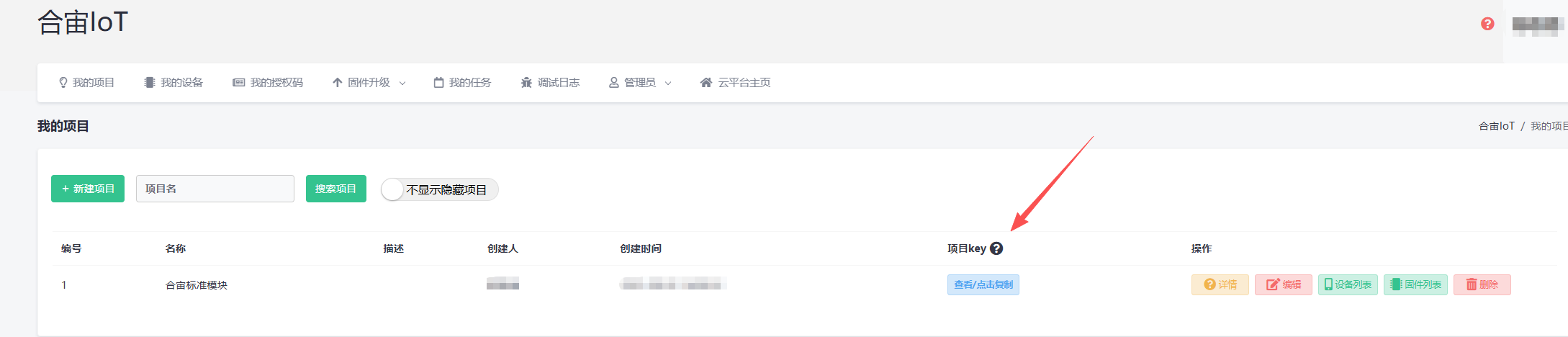
并将其添加到photo_to_aircloud.lua中;
-- 配置excloud参数
local project_auth_key = "123456"
5、烧录 DEMO 代码;
6、等待30S完成拍照后上传IOT.Luatos.com平台,LUATOOLS会有如下打印;
[2026-02-02 14:34:22.950] luat:U(3979):I/user.netdrv_wifi.ip_ready_func IP_READY 192.168.0.109 255.255.255.0 192.168.0.1 nil
[2026-02-02 14:34:22.999] luat:I(4008):DNS:dns all done ,now stop
[2026-02-02 14:34:22.999] luat:D(4008):net:adapter 2 connect 1.94.5.143:443 TCP
[2026-02-02 14:34:23.082] luat:U(4102):I/user.dnsproxy 开始监听
[2026-02-02 14:34:23.518] luat:U(4553):I/user.httpplus 服务器已完成响应,开始解析响应
[2026-02-02 14:34:23.549] luat:U(4570):I/user.[excloud]excloud.getip响应 HTTP Code: 200 Body: luat:U(4570):{"msg":"ok","conninfo":{"ipv4":"124.71.128.165","port":9108},"imginfo":{"url":"https://gps.openluat.com/iot/aircloud/upload/image","data_key":"f","data_param":{"key":"7ncH1zGBnNYNjoubiU3B6J7meUtFchBP96vvt","tip":""}},"audinfo":{"url":"https://gps.openluat.com/iot/aircloud/upload/audio","data_key":"f","data_param":{"key":"7ncH1zGBnNYNjoubiU3B6J7meUtFchBP96vvt","tip":""}},"mtninfo":{"url":"https://gps.openluat.com/iot/aircloud/upload/file","data_key":"f","data_param":{"key":"7ncH1zGBnNYNjoubiU3B6J7meUtFchBP96vvt","tip":""}}}luat:U(4570):
[2026-02-02 14:34:23.555] luat:U(4570):I/user.[excloud]excloud.getip响应 HTTP Code: 200 Body: luat:U(4571):{"msg":"ok","conninfo":{"ipv4":"124.71.128.165","port":9108},"imginfo":{"url":"https://gps.openluat.com/iot/aircloud/upload/image","data_key":"f","data_param":{"key":"7ncH1zGBnNYNjoubiU3B6J7meUtFchBP96vvt","tip":""}},"audinfo":{"url":"https://gps.openluat.com/iot/aircloud/upload/audio","data_key":"f","data_param":{"key":"7ncH1zGBnNYNjoubiU3B6J7meUtFchBP96vvt","tip":""}},"mtninfo":{"url":"https://gps.openluat.com/iot/aircloud/upload/file","data_key":"f","data_param":{"key":"7ncH1zGBnNYNjoubiU3B6J7meUtFchBP96vvt","tip":""}}}luat:U(4571):
[2026-02-02 14:34:23.555] luat:U(4572):I/user.[excloud]获取到TCP/UDP连接信息 host: 124.71.128.165 port: 9108
[2026-02-02 14:34:23.555] luat:U(4572):I/user.[excloud]获取到图片上传信息
[2026-02-02 14:34:23.555] luat:U(4572):I/user.[excloud]获取到音频上传信息
[2026-02-02 14:34:23.555] luat:U(4572):I/user.[excloud]获取到运维日志上传信息
[2026-02-02 14:34:23.555] luat:U(4572):I/user.[excloud]excloud.getip 更新配置: 124.71.128.165 9108
[2026-02-02 14:34:23.555] luat:U(4573):I/user.[excloud]excloud.getip 成功: true 结果: {"ipv4":"124.71.128.165","port":9108}
[2026-02-02 14:34:23.555] luat:U(4573):I/user.[excloud]服务器信息获取成功 host: 124.71.128.165 port: 9108 transport: tcp
[2026-02-02 14:34:23.555] luat:U(4573):I/user.[excloud]创建TCP连接
[2026-02-02 14:34:23.555] luat:D(4574):socket:connect to 124.71.128.165,9108
[2026-02-02 14:34:23.555] luat:U(4575):network_socket_connect 1610:network 2-0 local port auto select 52002
[2026-02-02 14:34:23.555] luat:D(4575):net:adapter 2 connect 124.71.128.165:9108 TCP
[2026-02-02 14:34:23.555] luat:U(4576):I/user.[excloud]TCP连接结果 true false
[2026-02-02 14:34:23.555] luat:U(4576):I/user.[excloud]excloud service started
[2026-02-02 14:34:23.555] luat:U(4576):I/user.excloud服务已开启
[2026-02-02 14:34:23.555] luat:U(4577):I/user.[excloud]excloud 自动心跳已启动,间隔 300 秒
[2026-02-02 14:34:23.555] luat:U(4578):I/user.自动心跳已启动
[2026-02-02 14:34:23.608] luat:U(4608):network_default_socket_callback 1123:before process socket 1,event:0xf2000009(连接成功),state:3(正在连接),wait:2(等待连接完成)
[2026-02-02 14:34:23.608] luat:U(4609):network_default_socket_callback 1127:after process socket 1,state:5(在线),wait:0(无等待)
[2026-02-02 14:34:23.608] luat:U(4610):I/user.[excloud]socket cb userdata: 609615E8 33554449 0
[2026-02-02 14:34:23.608] luat:U(4611):I/user.[excloud]socket TCP连接成功
[2026-02-02 14:34:23.608] luat:U(4613):I/user.[excloud]构建发送数据 16 3 jqDKVo10JaU82v9h5sEprAWDfdwQEgMa-C8C2C68C5DEA-54540D2936
[2026-02-02 14:34:23.608] luat:U(4614):I/user.[excloud]tlv发送数据长度4 60
[2026-02-02 14:34:23.608] luat:U(4615):                   I/user.[excloud]构建消息头 luat:U(4615):I/user.[excloud]发送消息长度 16 60 76 0200C8C2C68C5DEA0002003C00000011301000386A71444B566F31304A6155383276396835734570724157446664775145674D612D4338433243363843354445412D35343534304432393336 152
[2026-02-02 14:34:23.608] luat:U(4624):I/user.[excloud]数据发送成功 76 字节
[2026-02-02 14:34:23.635] luat:U(4649):network_default_socket_callback 1123:before process socket 1,event:0xf2000004(发送成功),state:5(在线),wait:3(等待发送完成)
[2026-02-02 14:34:23.635] luat:U(4649):network_default_socket_callback 1127:after process socket 1,state:5(在线),wait:0(无等待)
[2026-02-02 14:34:23.635] luat:U(4650):I/user.[excloud]socket cb userdata: 609615E8 33554450 0
[2026-02-02 14:34:23.635] luat:U(4650):I/user.[excloud]socket 发送完成
[2026-02-02 14:34:24.145] cal:I(5160):idx:41=42+(-1),r:54,xtal:77,pwr_gain:a4ab7131
[2026-02-02 14:34:31.910] luat:U(12924):I/user.sys ram 238200 46160 48224
[2026-02-02 14:34:31.910] luat:U(12924):I/user.lua ram 2097144 378392 511712
[2026-02-02 14:34:31.910] ap1:uvc_stre:W(12813):uvc_camera_device_power_on, port:5, device:0
[2026-02-02 14:34:31.910] ap1:uvc_stre:W(12813):uvc_camera_device_power_on, port:1, device:0, ret:0
[2026-02-02 14:34:31.923] luat:U(12939):I/user.初始化状态 true 这是第1个摄像头
[2026-02-02 14:34:31.923] luat:U(12940):I/user.照片存储路径 /ram/test.jpg
[2026-02-02 14:34:31.923] ap1:CAM:W(12827):拍照/录像到文件录 /ram/test.jpg
[2026-02-02 14:34:31.923] ap1:CAM:W(12827):选定的捕捉模式 1
[2026-02-02 14:34:32.382] luat:U(13393):I/user.摄像头数据 68703
[2026-02-02 14:34:32.382] luat:U(13394):I/user.拍照完成
[2026-02-02 14:34:32.382] luat:U(13395):I/user.这是第1个摄像头拍的
[2026-02-02 14:34:32.382] luat:U(13395):I/user.照片存储路径 /ram/test.jpg
[2026-02-02 14:34:32.382] luat:U(13395):I/user.文件存在,大小: 68703
[2026-02-02 14:34:41.914] luat:U(22924):I/user.sys ram 238200 46080 48224
[2026-02-02 14:34:41.914] luat:U(22925):I/user.lua ram 2097144 450632 581168
[2026-02-02 14:34:41.914] ap1:uvc_stre:W(22813):uvc_camera_device_power_on, port:5, device:0
[2026-02-02 14:34:41.914] ap1:uvc_stre:W(22813):uvc_camera_device_power_on, port:1, device:0, ret:0
[2026-02-02 14:34:41.914] luat:U(22939):I/user.初始化状态 true 这是第1个摄像头
[2026-02-02 14:34:41.929] luat:U(22940):I/user.照片存储路径 /ram/test.jpg
[2026-02-02 14:34:41.929] ap1:CAM:W(22827):拍照/录像到文件录 /ram/test.jpg
[2026-02-02 14:34:41.929] ap1:CAM:W(22827):选定的捕捉模式 1
[2026-02-02 14:34:42.370] luat:U(23394):I/user.摄像头数据 69022
[2026-02-02 14:34:42.375] luat:U(23395):I/user.拍照完成
[2026-02-02 14:34:42.375] luat:U(23395):I/user.这是第1个摄像头拍的
[2026-02-02 14:34:42.375] luat:U(23395):I/user.照片存储路径 /ram/test.jpg
[2026-02-02 14:34:42.375] luat:U(23396):I/user.文件存在,大小: 69022
[2026-02-02 14:34:42.497] luat:U(23518):I/user.开始上传图片
[2026-02-02 14:34:42.497] luat:U(23519):I/user.[excloud]开始文件上传 类型: 1 文件: /ram/test.jpg 大小: 69022
[2026-02-02 14:34:42.497] luat:U(23519):I/user.[excloud]开始文件上传 类型: 1 文件: test.jpg 大小: 69022
[2026-02-02 14:34:42.497] luat:U(23519):I/user.[excloud]构建发送数据 23 0 0
[2026-02-02 14:34:42.497] luat:U(23520):I/user.[excloud]构建发送数据 784 0 1
[2026-02-02 14:34:42.497] luat:U(23521):I/user.[excloud]构建发送数据 785 3 test.jpg
[2026-02-02 14:34:42.497] luat:U(23522):I/user.[excloud]构建发送数据 786 0 69022
[2026-02-02 14:34:42.497] luat:U(23522):I/user.[excloud]tlv发送数据长度4 36
[2026-02-02 14:34:42.562] luat:U(23523):                   I/user.[excloud]构建消息头 luat:U(23524):I/user.[excloud]发送消息长度 16 36 52 0200C8C2C68C5DEA00030024000000010017000400000000031000040000000133110008746573742E6A70670312000400010D9E 104
[2026-02-02 14:34:42.562] luat:U(23532):I/user.[excloud]数据发送成功 52 字节
[2026-02-02 14:34:42.562] luat:U(23557):I/user.[excloud]开始发送HTTP请求 URL: https://gps.openluat.com/iot/aircloud/upload/image
[2026-02-02 14:34:42.562] luat:I(23561):http:http idp:1
[2026-02-02 14:34:42.562] luat:D(23562):DNS:gps.openluat.com state 0 id 2 ipv6 0 use dns server0, try 0
[2026-02-02 14:34:42.562] luat:D(23562):net:adatper 2 dns server 223.5.5.5
[2026-02-02 14:34:42.562] luat:D(23562):net:dns udp sendto 223.5.5.5:53 from 192.168.0.109
[2026-02-02 14:34:42.583] luat:U(23568):network_default_socket_callback 1123:before process socket 1,event:0xf2000004(发送成功),state:5(在线),wait:3(等待发送完成)
[2026-02-02 14:34:42.583] luat:U(23568):network_default_socket_callback 1127:after process socket 1,state:5(在线),wait:0(无等待)
[2026-02-02 14:34:42.583] luat:U(23568):I/user.[excloud]socket cb userdata: 609615E8 33554450 0
[2026-02-02 14:34:42.583] luat:U(23569):I/user.[excloud]socket 发送完成
[2026-02-02 14:34:42.685] luat:I(23702):DNS:dns all done ,now stop
[2026-02-02 14:34:42.685] luat:D(23702):net:adapter 2 connect 1.94.5.143:443 TCP
[2026-02-02 14:34:43.298] cal:I(24313):idx:15=15+(0),r:54,xtal:76,pwr_gain:a4ab7090
[2026-02-02 14:34:44.943] luat:I(25969):http:http close 0x60a2bef8
[2026-02-02 14:34:44.948] luat:U(25971):I/user.[excloud]excloud.getip文件上传响应 HTTP Code: 200 Body: {"info":"iot./iot/aircloud/upload/image","code":0,"trace":"code:iot./iot/aircloud/upload/image,  trcace:","log":"^^^","value":{"uri":"/vsa/aircloud_image/E9MJkUWoD5TFMMPhHG88Ai/2026-02/C8C2C68C5DEA/20260202143446_test.jpg","size":"67.00KB","thumb":"/vsa/aircloud_image/E9MJkUWoD5TFMMPhHG88Ai/2026-02/C8C2C68C5DEA/20260202143446_testt.jpg"}}
[2026-02-02 14:34:44.948] luat:U(25972):I/user.[excloud]文件上传成功 URL: /vsa/aircloud_image/E9MJkUWoD5TFMMPhHG88Ai/2026-02/C8C2C68C5DEA/20260202143446_test.jpg
[2026-02-02 14:34:44.948] luat:U(25972):I/user.[excloud]构建发送数据 24 0 0
[2026-02-02 14:34:44.948] luat:U(25973):I/user.[excloud]构建发送数据 784 0 1
[2026-02-02 14:34:44.948] luat:U(25974):I/user.[excloud]构建发送数据 785 3 test.jpg
[2026-02-02 14:34:44.948] luat:U(25975):I/user.[excloud]构建发送数据 787 0 0
[2026-02-02 14:34:44.948] luat:U(25975):I/user.[excloud]tlv发送数据长度4 36
[2026-02-02 14:34:44.948] luat:U(25976):                   I/user.[excloud]构建消息头 luat:U(25977):I/user.[excloud]发送消息长度 16 36 52 0200C8C2C68C5DEA00040024000000010018000400000000031000040000000133110008746573742E6A70670313000400000000 104
[2026-02-02 14:34:44.948] luat:U(25985):I/user.[excloud]数据发送成功 52 字节
[2026-02-02 14:34:44.948] luat:U(25985):I/user.图片上传成功
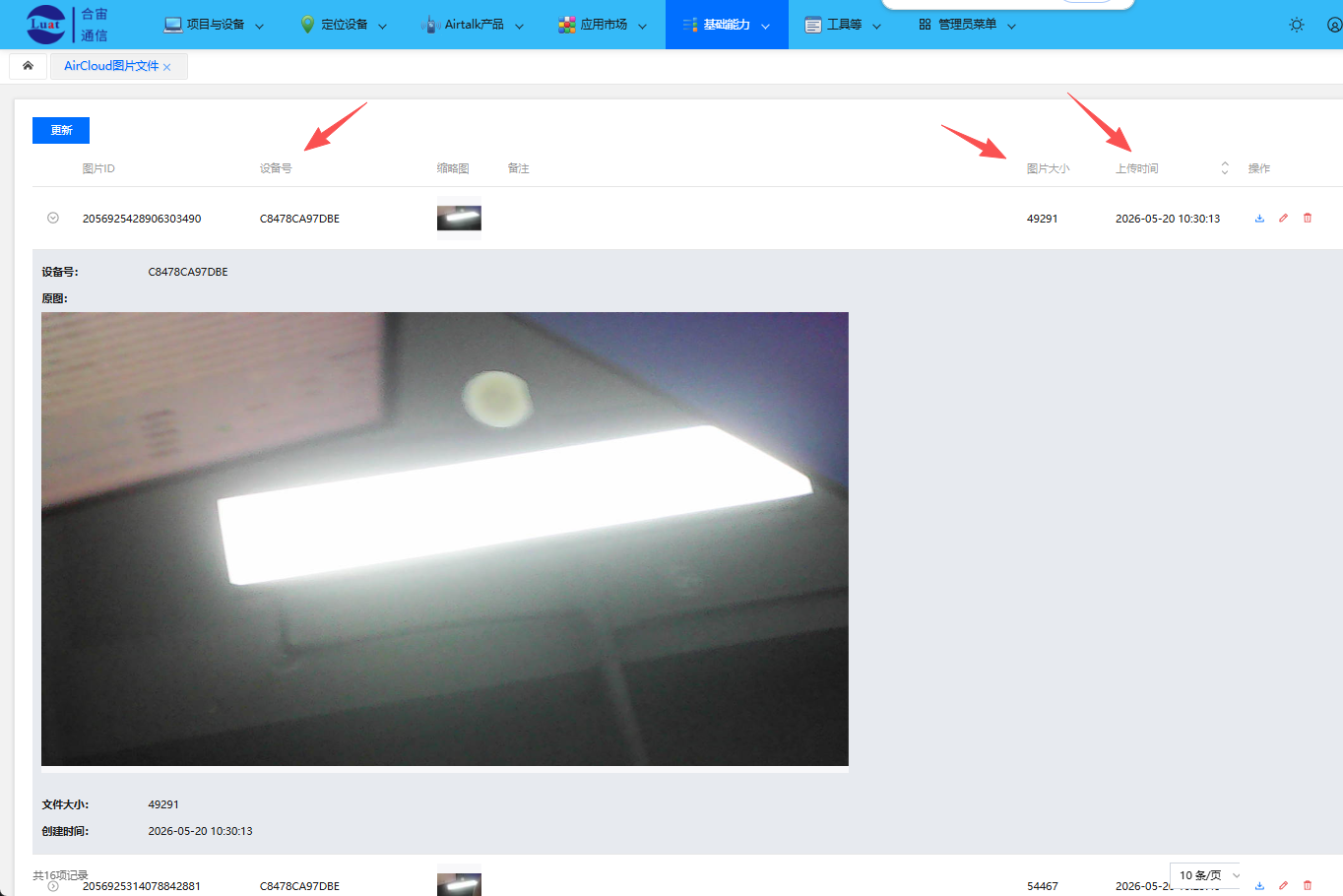
7、登录 https://iot.luatos.com/ ;
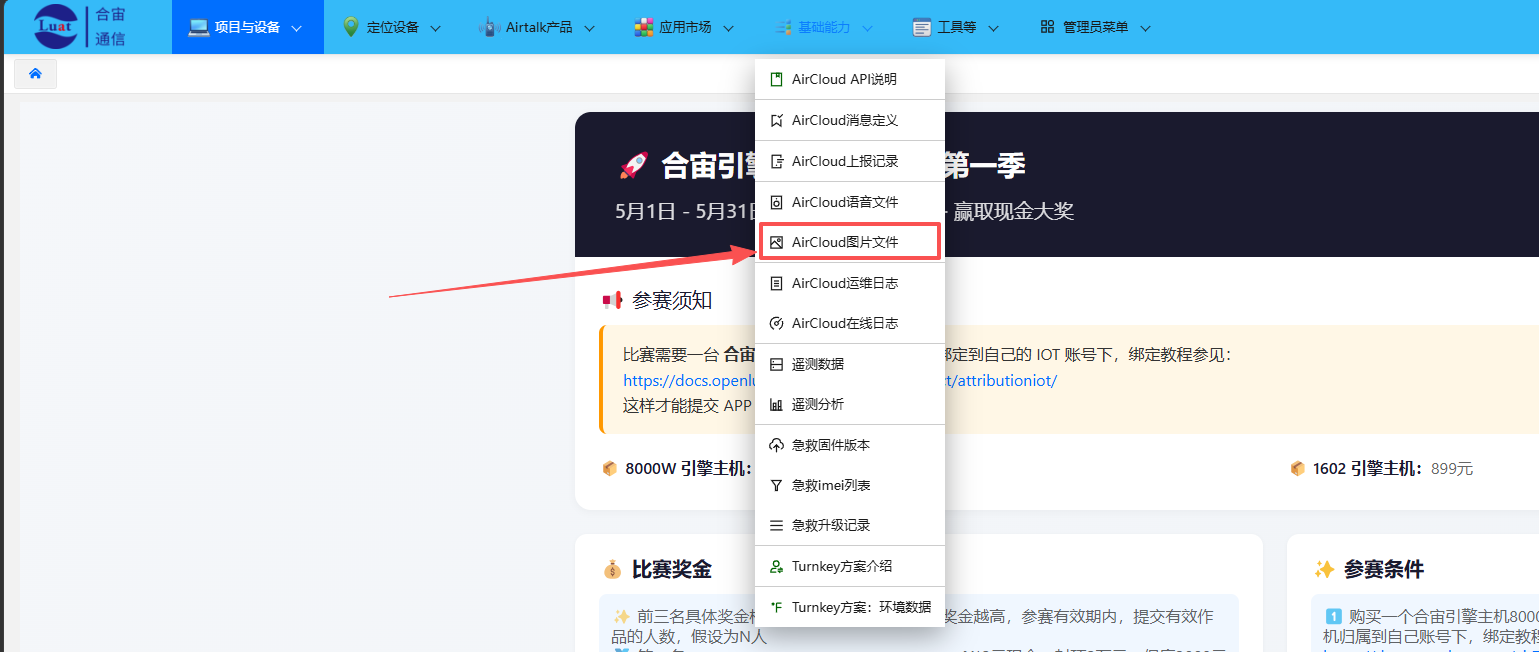
就可以根据您设备的IMEI号和上传时间查看您所上传的照片了;
8.2 录像后上传
使用录像功能演示的核心步骤:
1、搭建硬件环境;
2、修改 netdrv_wifi.lua 中的 WIFI 账号密码; 打开 main.lua 文件中 require "video_http_post" 同时注释掉 require "rtmp_app_post" 和 require "take_photo_http_post"
3、烧录 DEMO 代码; 单路摄像头请将 video_http_post.lua 中的 usb_port_num 修改为 1; 四路或多路摄像头请将 video_http_post.lua 中的 usb_port_num 修改为 4 或对应的摄像头数量;
4、等待单摄像头自动录像完成后上传平台,LUATOOLS 会有如下打印;
[2026-01-16 17:32:27.006] luat:U(1977):I/user.触发第 1 个摄像头视频录制
[2026-01-16 17:32:27.006] ap1:pm_ap:E(1867):Invalid gpio_id: 255
[2026-01-16 17:32:27.006] ap1:usb_driv:I(1867):USB_DRV_USB_OPEN!
[2026-01-16 17:32:27.006] ap1:uvc_stre:W(1871):uvc_camera_device_power_on, port:5, device:0
[2026-01-16 17:32:27.006] ap1:uvc_stre:W(1871):uvc_camera_device_power_on, port:5, device:0, ret:-17413
[2026-01-16 17:32:27.194] os:I(2170):psram:0x607a0000,size:131072
[2026-01-16 17:32:27.199] luat:U(2194):I/user.摄像头初始化状态 true USB端口: 1
[2026-01-16 17:32:27.199] luat:U(2195):I/user.开始录制视频到 /sd/video_usb1_2.mp4
[2026-01-16 17:32:27.199] luat:U(2196):I/user.excamera.video 开始录制视频到 /sd/video_usb1_2.mp4
[2026-01-16 17:32:27.199] luat:U(2196):I/user.excamera.video lua内存: 2097144 164536 168528
[2026-01-16 17:32:27.199] luat:U(2196):I/user.excamera.video sys内存: 238224 39256 39256
[2026-01-16 17:32:27.199] ap1:CAM:W(2081):拍照/录像到文件录 /sd/video_usb1_2.mp4
[2026-01-16 17:32:27.199] ap1:CAM:W(2081):选定的捕捉模式 4
[2026-01-16 17:32:28.654] wifid:I(3634):[KW:]scanu_start_req:ssid=茶室-降功耗,找合宙!
[2026-01-16 17:32:29.468] luat:I(4441):mp4box:start flush buffer 262144 bytes 0x60a0eb78
[2026-01-16 17:32:30.272] luat:I(5242):mp4box:start flush buffer 262144 bytes 0x60a0eb78
[2026-01-16 17:32:30.365] wifid:I(5339):[KW:]scanu_confirm:status=0,req_type=0,upload_cnt=8,recv_cnt=27,time=1706223us,result=1,rfcli=0
[2026-01-16 17:32:30.365] wpa:I(5340):Scan completed **in** 1.704000 seconds
[2026-01-16 17:32:30.365] hitf:I(5340):get scan result:1
[2026-01-16 17:32:30.365] wpa:I(5341):State: SCANNING -> ASSOCIATING
[2026-01-16 17:32:30.365] wifid:I(5342):[KW:]conn vif0-0,auth_type:0,bssid:de8c-21f9-aa02,ssid:茶室-降功耗,找合宙!,is encryp:8.
[2026-01-16 17:32:30.365] wifid:I(5343):chan_ctxt_add: CTXT1,freq2452MHz,bw20MHz,pwr30dBm
[2026-01-16 17:32:30.365] wifid:I(5343):chan_reg_fix:VIF0,CTXT1,type3,ctxt_s0,nb_vif0
[2026-01-16 17:32:30.365] wifid:I(5344):mm_sta_add:vif 0,sta 1,status 0
[2026-01-16 17:32:30.585] wifid:I(5553):[KW:]auth_send:seq1, txtype0, auth_type0, seq93
[2026-01-16 17:32:30.585] wifid:I(5559):[KW:]sm_auth_handler: status code 0, tx status 0x80800100
[2026-01-16 17:32:30.585] wifid:I(5559):[KW:]assoc_req_send:is ht, seq_num:94
[2026-01-16 17:32:30.585] wifid:I(5567):[KW:]assoc_rsp:status0,tx_s0x80800000
[2026-01-16 17:32:30.605] wifid:I(5567):[KW:]mm_set_vif_state,vif=0,vif_type=0,is_active=1, aid=0x3,rssi=-45
[2026-01-16 17:32:30.605] wpa:I(5569):State: ASSOCIATING -> ASSOCIATED
[2026-01-16 17:32:30.605] wpa:I(5577):State: ASSOCIATED -> 4WAY_HANDSHAKE
[2026-01-16 17:32:30.605] wpa:I(5577):WPA: TK c5e69b344c8cc0925dd94e492f35f80b
[2026-01-16 17:32:30.605] wpa:I(5586):State: 4WAY_HANDSHAKE -> 4WAY_HANDSHAKE
[2026-01-16 17:32:30.605] hitf:I(5603):add CCMP
[2026-01-16 17:32:30.605] wpa:I(5603):State: 4WAY_HANDSHAKE -> GROUP_HANDSHAKE
[2026-01-16 17:32:30.634] hitf:I(5604):add CCMP
[2026-01-16 17:32:30.634] wpa:I(5604):State: GROUP_HANDSHAKE -> COMPLETED
[2026-01-16 17:32:30.634] lwip:I(5605):sta ip start
[2026-01-16 17:32:30.634] lwip:I(5605):[KW:]sta:DHCP_DISCOVER()
[2026-01-16 17:32:30.634] lwip:I(5622):[KW:]sta:DHCP_OFFER received **in** DHCP_STATE_SELECTING state
[2026-01-16 17:32:30.634] lwip:I(5622):[KW:]sta:DHCP_REQUEST(netif=0x28065588) en   1
[2026-01-16 17:32:31.056] luat:I(6035):mp4box:start flush buffer 262144 bytes 0x60a0eb78
[2026-01-16 17:32:31.196] lwip:I(6167):[KW:]sta:DHCP_ACK received
[2026-01-16 17:32:31.196] wifid:I(6168):[KW:]me dhcp done vif:0
[2026-01-16 17:32:31.196] event:W(6170):event <2 0> has no cb
[2026-01-16 17:32:31.196] ap1:lwip:I(6056):sta ip start
[2026-01-16 17:32:31.196] luat:D(6173):wlan:event_module 1 event_id 2
[2026-01-16 17:32:31.196] luat:D(6173):wlan:STA connected 茶室-降功耗,找合宙!
[2026-01-16 17:32:31.196] luat:D(6174):wlan:event_module 2 event_id 0
[2026-01-16 17:32:31.196] luat:D(6174):wlan:ipv4 got!! 192.168.31.234
[2026-01-16 17:32:31.196] luat:D(6174):net:network ready 2, setup dns server
[2026-01-16 17:32:31.276] luat:D(6251):wlan:sta ip 192.168.31.234
[2026-01-16 17:32:31.276] luat:U(6253):I/user.dnsproxy 开始监听
[2026-01-16 17:32:31.276] luat:D(6253):net:设置DNS服务器 id 2 index 0 ip 223.5.5.5
[2026-01-16 17:32:31.276] luat:D(6253):net:设置DNS服务器 id 2 index 1 ip 114.114.114.114
[2026-01-16 17:32:31.276] luat:U(6254):I/user.netdrv_wifi.ip_ready_func IP_READY 192.168.31.234 255.255.255.0 192.168.31.1 nil
[2026-01-16 17:32:31.856] luat:I(6829):mp4box:start flush buffer 262144 bytes 0x60a0eb78
[2026-01-16 17:32:32.187] cal:I(7179):idx:41=41+(0),r:54,xtal:75,pwr_gain:a4ab7131
[2026-01-16 17:32:32.579] luat:I(7557):mp4box:start flush buffer 262144 bytes 0x60a0eb78
[2026-01-16 17:32:33.375] luat:I(8357):mp4box:start flush buffer 262144 bytes 0x60a0eb78
[2026-01-16 17:32:34.302] luat:I(9280):mp4box:start flush buffer 262144 bytes 0x60a0eb78
[2026-01-16 17:32:35.490] luat:I(10467):mp4box:start flush buffer 262144 bytes 0x60a0eb78
[2026-01-16 17:32:36.594] luat:I(11591):mp4box:start flush buffer 262144 bytes 0x60a0eb78
[2026-01-16 17:32:37.003] luat:U(11977):I/user.系统内存使用情况 238224 128312 128760
[2026-01-16 17:32:37.003] luat:U(11978):I/user.Lua虚拟机内存使用情况 2097144 165736 168528
[2026-01-16 17:32:37.287] luat:I(12260):mp4box:start flush buffer 262144 bytes 0x60a0eb78
[2026-01-16 17:32:37.943] luat:I(12924):mp4box:start flush buffer 262144 bytes 0x60a0eb78
[2026-01-16 17:32:38.349] luat:I(13330):mp4box:start flush buffer 262144 bytes 0x60a0eb78
[2026-01-16 17:32:38.879] luat:I(13852):mp4box:start flush buffer 262144 bytes 0x60a0eb78
[2026-01-16 17:32:39.528] luat:I(14517):mp4box:start flush buffer 262144 bytes 0x60a0eb78
[2026-01-16 17:32:40.000] luat:I(14983):mp4box:start flush buffer 262144 bytes 0x60a0eb78
[2026-01-16 17:32:40.408] luat:I(15379):mp4box:start flush buffer 262144 bytes 0x60a0eb78
[2026-01-16 17:32:40.936] luat:I(15910):mp4box:start flush buffer 262144 bytes 0x60a0eb78
[2026-01-16 17:32:41.264] luat:I(16237):mp4box:start flush buffer 262144 bytes 0x60a0eb78
[2026-01-16 17:32:41.659] luat:I(16637):mp4box:start flush buffer 262144 bytes 0x60a0eb78
[2026-01-16 17:32:42.050] luat:I(17029):mp4box:start flush buffer 262144 bytes 0x60a0eb78
[2026-01-16 17:32:42.382] luat:I(17365):mp4box:start flush buffer 262144 bytes 0x60a0eb78
[2026-01-16 17:32:42.791] luat:I(17764):mp4box:start flush buffer 262144 bytes 0x60a0eb78
[2026-01-16 17:32:43.183] luat:I(18163):mp4box:start flush buffer 262144 bytes 0x60a0eb78
[2026-01-16 17:32:43.649] luat:I(18624):mp4box:start flush buffer 262144 bytes 0x60a0eb78
[2026-01-16 17:32:43.981] luat:I(18951):mp4box:start flush buffer 262144 bytes 0x60a0eb78
[2026-01-16 17:32:44.451] luat:I(19420):mp4box:start flush buffer 262144 bytes 0x60a0eb78
[2026-01-16 17:32:44.971] luat:I(19948):mp4box:start flush buffer 262144 bytes 0x60a0eb78
[2026-01-16 17:32:46.020] luat:I(21004):mp4box:start flush buffer 262144 bytes 0x60a0eb78
[2026-01-16 17:32:47.003] luat:U(21979):I/user.系统内存使用情况 238224 128360 128760
[2026-01-16 17:32:47.003] luat:U(21980):I/user.Lua虚拟机内存使用情况 2097144 166032 168528
[2026-01-16 17:32:47.014] luat:I(21996):mp4box:start flush buffer 262144 bytes 0x60a0eb78
[2026-01-16 17:32:48.084] luat:I(23062):mp4box:start flush buffer 262144 bytes 0x60a0eb78
[2026-01-16 17:32:49.185] luat:I(24183):mp4box:start flush buffer 262144 bytes 0x60a0eb78
[2026-01-16 17:32:50.271] luat:I(25239):mp4box:start flush buffer 262144 bytes 0x60a0eb78
[2026-01-16 17:32:51.322] luat:I(26306):mp4box:start flush buffer 262144 bytes 0x60a0eb78
[2026-01-16 17:32:52.395] luat:I(27366):mp4box:start flush buffer 262144 bytes 0x60a0eb78
[2026-01-16 17:32:53.583] luat:I(28553):mp4box:start flush buffer 262144 bytes 0x60a0eb78
[2026-01-16 17:32:54.638] luat:I(29620):mp4box:start flush buffer 262144 bytes 0x60a0eb78
[2026-01-16 17:32:55.769] luat:I(30741):mp4box:start flush buffer 262144 bytes 0x60a0eb78
[2026-01-16 17:32:56.836] luat:I(31807):mp4box:start flush buffer 262144 bytes 0x60a0eb78
[2026-01-16 17:32:57.008] luat:U(31981):I/user.系统内存使用情况 238224 128360 128760
[2026-01-16 17:32:57.008] luat:U(31982):I/user.Lua虚拟机内存使用情况 2097144 166264 168528
[2026-01-16 17:32:57.245] luat:I(32241):mp4box:start flush buffer 102901 bytes 0x60a0eb78
[2026-01-16 17:32:57.292] luat:I(32267):mp4box:mp4 file size before mdat 10326517
[2026-01-16 17:32:57.298] luat:I(32291):mp4box:总帧数 445, 关键帧数 4 总耗时 29406ms 平均帧率 15 fps
[2026-01-16 17:32:57.298] luat:I(32291):mp4box:mp4 file final size 10332500
[2026-01-16 17:32:57.311] luat:I(32300):mp4box:mp4 file closed, box write finished, file closed
[2026-01-16 17:32:57.311] luat:U(32301):I/user.excamera.video lua内存: 2097144 166480 168528
[2026-01-16 17:32:57.311] luat:U(32302):I/user.excamera.video sys内存: 238224 122120 128760
[2026-01-16 17:32:57.311] luat:U(32302):I/user.excamera.video 视频录制完成 /sd/video_usb1_2.mp4
[2026-01-16 17:32:57.435] luat:U(32412):I/user.视频录制成功!
[2026-01-16 17:32:57.441] luat:D(32420):socket:connect to upload.air32.cn,80
[2026-01-16 17:32:57.441] luat:D(32420):DNS:upload.air32.cn state 0 id 1 ipv6 0 use dns server0, try 0
[2026-01-16 17:32:57.441] luat:D(32420):net:adatper 2 dns server 223.5.5.5
[2026-01-16 17:32:57.441] luat:D(32421):net:dns udp sendto 223.5.5.5:53 from 192.168.31.234
[2026-01-16 17:32:57.622] luat:I(32603):DNS:dns all done ,now stop
[2026-01-16 17:32:57.622] luat:D(32603):net:adapter 2 connect 49.232.89.122:80 TCP
[2026-01-16 17:32:57.748] luat:I(32740):zbuff:create large size: 128 kbyte, trigger force GC
[2026-01-16 17:33:07.009] luat:U(41983):I/user.系统内存使用情况 238224 120472 128760
[2026-01-16 17:33:07.009] luat:U(41984):I/user.Lua虚拟机内存使用情况 2097144 172288 172288
[2026-01-16 17:33:17.131] luat:U(52129):I/user.系统内存使用情况 238224 120472 128760
[2026-01-16 17:33:17.131] luat:U(52130):I/user.Lua虚拟机内存使用情况 2097144 180488 180488
[2026-01-16 17:33:27.258] luat:U(62235):I/user.系统内存使用情况 238224 120472 128760
[2026-01-16 17:33:27.258] luat:U(62236):I/user.Lua虚拟机内存使用情况 2097144 188048 188048
[2026-01-16 17:33:37.584] luat:U(72557):I/user.系统内存使用情况 238224 120472 128760
[2026-01-16 17:33:37.584] luat:U(72558):I/user.Lua虚拟机内存使用情况 2097144 196152 196152
[2026-01-16 17:33:47.570] luat:U(82558):I/user.系统内存使用情况 238224 120472 128760
[2026-01-16 17:33:47.570] luat:U(82559):I/user.Lua虚拟机内存使用情况 2097144 203728 203728
[2026-01-16 17:33:53.080] luat:U(88049):I/user.httpplus 等待服务器完成响应
[2026-01-16 17:33:53.224] luat:U(88193):I/user.httpplus 服务器已完成响应,开始解析响应
[2026-01-16 17:33:53.224] luat:U(88202):I/user.http上传完成,状态码: 200
[2026-01-16 17:33:53.224] luat:U(88203):I/user.上传成功
等待 4 路摄像头自动轮切录像完成后上传平台,LUATOOLS 会有如下打印;
[2026-01-16 17:11:28.263] luat:U(1974):I/user.触发第 1 个摄像头视频录制
[2026-01-16 17:11:28.263] ap1:pm_ap:E(1863):Invalid gpio_id: 255
[2026-01-16 17:11:28.263] ap1:usb_driv:I(1863):USB_DRV_USB_OPEN!
[2026-01-16 17:11:28.263] ap1:uvc_stre:W(1867):uvc_camera_device_power_on, port:5, device:0
[2026-01-16 17:11:28.263] ap1:uvc_stre:W(1867):uvc_camera_device_power_on, port:5, device:0, ret:-17413
[2026-01-16 17:11:28.387] os:I(2101):psram:0x607a0000,size:131072
[2026-01-16 17:11:28.987] luat:U(2706):I/user.摄像头初始化状态 true USB端口: 1
[2026-01-16 17:11:28.987] luat:U(2707):I/user.开始录制视频到 /sd/video_usb1_2.mp4
[2026-01-16 17:11:28.987] luat:U(2707):I/user.excamera.video 开始录制视频到 /sd/video_usb1_2.mp4
[2026-01-16 17:11:28.987] luat:U(2708):I/user.excamera.video lua内存: 2097144 164536 168528
[2026-01-16 17:11:28.987] luat:U(2708):I/user.excamera.video sys内存: 238224 39256 39256
[2026-01-16 17:11:28.987] ap1:CAM:W(2592):拍照/录像到文件录 /sd/video_usb1_2.mp4
[2026-01-16 17:11:28.987] ap1:CAM:W(2592):选定的捕捉模式 4
[2026-01-16 17:11:29.332] wifid:I(3036):[KW:]conn vif0-0,auth_type:3,bssid:de8c-21f9-aa02,ssid:茶室-降功耗,找合宙!,is encryp:8.
[2026-01-16 17:11:30.417] luat:D(4139):wlan:STA connected 茶室-降功耗,找合宙!
[2026-01-16 17:11:30.417] luat:D(4139):wlan:event_module 2 event_id 0
[2026-01-16 17:11:30.417] luat:D(4139):wlan:ipv4 got!! 192.168.31.234
[2026-01-16 17:11:30.417] luat:D(4140):net:network ready 2, setup dns server
[2026-01-16 17:11:30.417] luat:D(4150):wlan:sta ip 192.168.31.234
[2026-01-16 17:11:30.417] luat:U(4151):I/user.dnsproxy 开始监听
[2026-01-16 17:11:30.417] luat:D(4152):net:设置DNS服务器 id 2 index 0 ip 223.5.5.5
[2026-01-16 17:11:30.417] luat:D(4152):net:设置DNS服务器 id 2 index 1 ip 114.114.114.114
[2026-01-16 17:11:30.417] luat:U(4153):I/user.netdrv_wifi.ip_ready_func IP_READY 192.168.31.234 255.255.255.0 192.168.31.1 nil
[2026-01-16 17:11:31.310] luat:I(5032):mp4box:start flush buffer 262144 bytes 0x60a0f4e0
[2026-01-16 17:11:32.455] luat:I(6168):mp4box:start flush buffer 262144 bytes 0x60a0f4e0
[2026-01-16 17:11:33.523] luat:I(7232):mp4box:start flush buffer 262144 bytes 0x60a0f4e0
[2026-01-16 17:11:34.653] luat:I(8366):mp4box:start flush buffer 262144 bytes 0x60a0f4e0
[2026-01-16 17:11:35.712] luat:I(9430):mp4box:start flush buffer 262144 bytes 0x60a0f4e0
[2026-01-16 17:11:36.858] luat:I(10565):mp4box:start flush buffer 262144 bytes 0x60a0f4e0
[2026-01-16 17:11:37.850] luat:I(11567):mp4box:start flush buffer 262144 bytes 0x60a0f4e0
[2026-01-16 17:11:38.256] luat:U(11973):I/user.系统内存使用情况 238224 128776 129256
[2026-01-16 17:11:38.256] luat:U(11974):I/user.Lua虚拟机内存使用情况 2097144 165736 168528
[2026-01-16 17:11:38.976] luat:I(12698):mp4box:start flush buffer 262144 bytes 0x60a0f4e0
[2026-01-16 17:11:40.111] luat:I(13832):mp4box:start flush buffer 262144 bytes 0x60a0f4e0
[2026-01-16 17:11:41.182] luat:I(14897):mp4box:start flush buffer 262144 bytes 0x60a0f4e0
[2026-01-16 17:11:42.252] luat:I(15963):mp4box:start flush buffer 262144 bytes 0x60a0f4e0
[2026-01-16 17:11:43.387] luat:I(17099):mp4box:start flush buffer 262144 bytes 0x60a0f4e0
[2026-01-16 17:11:44.447] luat:I(18164):mp4box:start flush buffer 262144 bytes 0x60a0f4e0
[2026-01-16 17:11:45.589] luat:I(19299):mp4box:start flush buffer 262144 bytes 0x60a0f4e0
[2026-01-16 17:11:46.653] luat:I(20363):mp4box:start flush buffer 262144 bytes 0x60a0f4e0
[2026-01-16 17:11:47.758] luat:I(21494):mp4box:start flush buffer 262144 bytes 0x60a0f4e0
[2026-01-16 17:11:48.263] luat:U(21974):I/user.系统内存使用情况 238224 128776 129256
[2026-01-16 17:11:48.263] luat:U(21975):I/user.Lua虚拟机内存使用情况 2097144 166000 168528
[2026-01-16 17:11:48.829] luat:I(22566):mp4box:start flush buffer 262144 bytes 0x60a0f4e0
[2026-01-16 17:11:49.984] luat:I(23699):mp4box:start flush buffer 262144 bytes 0x60a0f4e0
[2026-01-16 17:11:50.599] cal:I(24315):idx:41=41+(0),r:54,xtal:75,pwr_gain:a4ab7131
[2026-01-16 17:11:51.045] luat:I(24762):mp4box:start flush buffer 262144 bytes 0x60a0f4e0
[2026-01-16 17:11:52.103] luat:I(25827):mp4box:start flush buffer 262144 bytes 0x60a0f4e0
[2026-01-16 17:11:53.250] luat:I(26963):mp4box:start flush buffer 262144 bytes 0x60a0f4e0
[2026-01-16 17:11:54.310] luat:I(28029):mp4box:start flush buffer 262144 bytes 0x60a0f4e0
[2026-01-16 17:11:55.374] luat:I(29096):mp4box:start flush buffer 262144 bytes 0x60a0f4e0
[2026-01-16 17:11:56.511] luat:I(30231):mp4box:start flush buffer 262144 bytes 0x60a0f4e0
[2026-01-16 17:11:57.587] luat:I(31298):mp4box:start flush buffer 262144 bytes 0x60a0f4e0
[2026-01-16 17:11:58.245] luat:U(31976):I/user.系统内存使用情况 238224 128824 129256
[2026-01-16 17:11:58.245] luat:U(31977):I/user.Lua虚拟机内存使用情况 2097144 166264 168528
[2026-01-16 17:11:58.718] luat:I(32431):mp4box:start flush buffer 262144 bytes 0x60a0f4e0
[2026-01-16 17:11:59.004] luat:I(32717):mp4box:start flush buffer 75336 bytes 0x60a0f4e0
[2026-01-16 17:11:59.012] luat:I(32736):mp4box:mp4 file size before mdat 7153224
[2026-01-16 17:11:59.052] luat:I(32763):mp4box:总帧数 448, 关键帧数 4 总耗时 29783ms 平均帧率 15 fps
[2026-01-16 17:11:59.052] luat:I(32763):mp4box:mp4 file final size 7159243
[2026-01-16 17:11:59.052] luat:I(32773):mp4box:mp4 file closed, box write finished, file closed
[2026-01-16 17:11:59.052] luat:U(32774):I/user.excamera.video lua内存: 2097144 166480 168528
[2026-01-16 17:11:59.052] luat:U(32774):I/user.excamera.video sys内存: 238224 122584 129256
[2026-01-16 17:11:59.052] luat:U(32774):I/user.excamera.video 视频录制完成 /sd/video_usb1_2.mp4
[2026-01-16 17:11:59.162] luat:U(32885):I/user.视频录制成功!
[2026-01-16 17:11:59.169] luat:D(32893):socket:connect to upload.air32.cn,80
[2026-01-16 17:11:59.169] luat:D(32893):DNS:upload.air32.cn state 0 id 1 ipv6 0 use dns server0, try 0
[2026-01-16 17:11:59.169] luat:D(32893):net:adatper 2 dns server 223.5.5.5
[2026-01-16 17:11:59.169] luat:D(32893):net:dns udp sendto 223.5.5.5:53 from 192.168.31.234
[2026-01-16 17:11:59.209] luat:I(32933):DNS:dns all done ,now stop
[2026-01-16 17:11:59.209] luat:D(32934):net:adapter 2 connect 49.232.89.122:80 TCP
[2026-01-16 17:11:59.258] luat:I(32970):zbuff:create large size: 128 kbyte, trigger force GC
[2026-01-16 17:12:08.363] luat:U(42080):I/user.系统内存使用情况 238224 120936 129256
[2026-01-16 17:12:08.363] luat:U(42081):I/user.Lua虚拟机内存使用情况 2097144 172544 172544
[2026-01-16 17:12:18.361] luat:U(52081):I/user.系统内存使用情况 238224 120936 129256
[2026-01-16 17:12:18.361] luat:U(52082):I/user.Lua虚拟机内存使用情况 2097144 179696 179696
[2026-01-16 17:12:28.362] luat:U(62082):I/user.系统内存使用情况 238224 120936 129256
[2026-01-16 17:12:28.362] luat:U(62083):I/user.Lua虚拟机内存使用情况 2097144 186744 186744
[2026-01-16 17:12:38.719] luat:U(72443):I/user.系统内存使用情况 238224 120936 129256
[2026-01-16 17:12:38.719] luat:U(72444):I/user.Lua虚拟机内存使用情况 2097144 194312 194312
[2026-01-16 17:12:40.304] luat:U(74034):I/user.httpplus 等待服务器完成响应
[2026-01-16 17:12:40.335] luat:U(74066):I/user.httpplus 服务器已完成响应,开始解析响应
[2026-01-16 17:12:40.340] luat:U(74075):I/user.http上传完成,状态码: 200
[2026-01-16 17:12:40.340] luat:U(74076):I/user.上传成功
[2026-01-16 17:12:40.340] luat:U(74077):I/user.触发第 2 个摄像头视频录制
[2026-01-16 17:12:40.340] ap1:uvc_stre:W(73963):uvc_camera_device_power_on, port:5, device:0
[2026-01-16 17:12:40.340] ap1:uvc_stre:W(73964):uvc_camera_device_power_on, port:1, device:0, ret:0
[2026-01-16 17:12:40.360] luat:U(74091):I/user.摄像头初始化状态 true USB端口: 2
[2026-01-16 17:12:40.360] luat:U(74092):I/user.开始录制视频到 /sd/video_usb2_74.mp4
[2026-01-16 17:12:40.360] luat:U(74092):I/user.excamera.video 开始录制视频到 /sd/video_usb2_74.mp4
[2026-01-16 17:12:40.360] luat:U(74092):I/user.excamera.video lua内存: 2097144 201224 201640
[2026-01-16 17:12:40.360] luat:U(74093):I/user.excamera.video sys内存: 238224 122480 129256
[2026-01-16 17:12:40.360] ap1:CAM:W(73978):拍照/录像到文件录 /sd/video_usb2_74.mp4
[2026-01-16 17:12:40.360] ap1:CAM:W(73978):选定的捕捉模式 4
[2026-01-16 17:12:40.660] cal:I(74379):idx:41=41+(0),r:54,xtal:75,pwr_gain:a4ab7131
[2026-01-16 17:12:41.536] luat:I(75274):mp4box:start flush buffer 262144 bytes 0x60a56f68
[2026-01-16 17:12:42.151] luat:I(75874):mp4box:start flush buffer 262144 bytes 0x60a56f68
[2026-01-16 17:12:42.737] luat:I(76467):mp4box:start flush buffer 262144 bytes 0x60a56f68
[2026-01-16 17:12:43.335] luat:I(77060):mp4box:start flush buffer 262144 bytes 0x60a56f68
[2026-01-16 17:12:43.935] luat:I(77664):mp4box:start flush buffer 262144 bytes 0x60a56f68
[2026-01-16 17:12:44.530] luat:I(78257):mp4box:start flush buffer 262144 bytes 0x60a56f68
[2026-01-16 17:12:45.125] luat:I(78851):mp4box:start flush buffer 262144 bytes 0x60a56f68
[2026-01-16 17:12:45.726] luat:I(79453):mp4box:start flush buffer 262144 bytes 0x60a56f68
[2026-01-16 17:12:46.262] luat:I(79983):mp4box:start flush buffer 262144 bytes 0x60a56f68
[2026-01-16 17:12:46.858] luat:I(80577):mp4box:start flush buffer 262144 bytes 0x60a56f68
[2026-01-16 17:12:47.438] luat:I(81170):mp4box:start flush buffer 262144 bytes 0x60a56f68
[2026-01-16 17:12:48.046] luat:I(81773):mp4box:start flush buffer 262144 bytes 0x60a56f68
[2026-01-16 17:12:48.639] luat:I(82365):mp4box:start flush buffer 262144 bytes 0x60a56f68
[2026-01-16 17:12:48.718] luat:U(82445):I/user.系统内存使用情况 238224 128824 129256
[2026-01-16 17:12:48.718] luat:U(82446):I/user.Lua虚拟机内存使用情况 2097144 201696 201696
[2026-01-16 17:12:49.240] luat:I(82964):mp4box:start flush buffer 262144 bytes 0x60a56f68
[2026-01-16 17:12:50.294] luat:I(84017):mp4box:start flush buffer 262144 bytes 0x60a56f68
[2026-01-16 17:12:51.425] luat:I(85147):mp4box:start flush buffer 262144 bytes 0x60a56f68
[2026-01-16 17:12:52.477] luat:I(86203):mp4box:start flush buffer 262144 bytes 0x60a56f68
[2026-01-16 17:12:53.541] luat:I(87270):mp4box:start flush buffer 262144 bytes 0x60a56f68
[2026-01-16 17:12:54.669] luat:I(88390):mp4box:start flush buffer 262144 bytes 0x60a56f68
[2026-01-16 17:12:55.735] luat:I(89455):mp4box:start flush buffer 262144 bytes 0x60a56f68
[2026-01-16 17:12:56.841] luat:I(90574):mp4box:start flush buffer 262144 bytes 0x60a56f68
[2026-01-16 17:12:57.837] luat:I(91576):mp4box:start flush buffer 262144 bytes 0x60a56f68
[2026-01-16 17:12:58.715] luat:U(92447):I/user.系统内存使用情况 238224 128824 129256
[2026-01-16 17:12:58.715] luat:U(92448):I/user.Lua虚拟机内存使用情况 2097144 201912 201912
[2026-01-16 17:12:59.105] luat:I(92829):mp4box:start flush buffer 262144 bytes 0x60a56f68
[2026-01-16 17:13:00.162] luat:I(93895):mp4box:start flush buffer 262144 bytes 0x60a56f68
[2026-01-16 17:13:01.231] luat:I(94950):mp4box:start flush buffer 262144 bytes 0x60a56f68
[2026-01-16 17:13:02.338] luat:I(96079):mp4box:start flush buffer 262144 bytes 0x60a56f68
[2026-01-16 17:13:03.417] luat:I(97137):mp4box:start flush buffer 262144 bytes 0x60a56f68
[2026-01-16 17:13:04.513] luat:I(98257):mp4box:start flush buffer 262144 bytes 0x60a56f68
[2026-01-16 17:13:05.602] luat:I(99324):mp4box:start flush buffer 262144 bytes 0x60a56f68
[2026-01-16 17:13:06.784] luat:I(100514):mp4box:start flush buffer 262144 bytes 0x60a56f68
[2026-01-16 17:13:07.848] luat:I(101569):mp4box:start flush buffer 262144 bytes 0x60a56f68
[2026-01-16 17:13:08.730] luat:U(102449):I/user.系统内存使用情况 238224 128776 129256
[2026-01-16 17:13:08.730] luat:U(102450):I/user.Lua虚拟机内存使用情况 2097144 202152 202152
[2026-01-16 17:13:08.907] luat:I(102635):mp4box:start flush buffer 262144 bytes 0x60a56f68
[2026-01-16 17:13:10.043] luat:I(103764):mp4box:start flush buffer 262144 bytes 0x60a56f68
[2026-01-16 17:13:10.439] luat:I(104160):mp4box:start flush buffer 91402 bytes 0x60a56f68
[2026-01-16 17:13:10.442] luat:I(104183):mp4box:mp4 file size before mdat 8742154
[2026-01-16 17:13:10.471] luat:I(104203):mp4box:总帧数 446, 关键帧数 4 总耗时 29472ms 平均帧率 15 fps
[2026-01-16 17:13:10.471] luat:I(104203):mp4box:mp4 file final size 8748149
[2026-01-16 17:13:10.481] luat:I(104213):mp4box:mp4 file closed, box write finished, file closed
[2026-01-16 17:13:10.481] luat:U(104214):I/user.excamera.video lua内存: 2097144 202360 202360
[2026-01-16 17:13:10.481] luat:U(104214):I/user.excamera.video sys内存: 238224 122584 129256
[2026-01-16 17:13:10.481] luat:U(104215):I/user.excamera.video 视频录制完成 /sd/video_usb2_74.mp4
[2026-01-16 17:13:10.598] luat:U(104325):I/user.视频录制成功!
[2026-01-16 17:13:10.606] luat:D(104337):socket:connect to upload.air32.cn,80
[2026-01-16 17:13:10.606] luat:D(104337):DNS:upload.air32.cn state 0 id 2 ipv6 0 use dns server0, try 0
[2026-01-16 17:13:10.606] luat:D(104337):net:adatper 2 dns server 223.5.5.5
[2026-01-16 17:13:10.606] luat:D(104337):net:dns udp sendto 223.5.5.5:53 from 192.168.31.234
[2026-01-16 17:13:10.606] luat:I(104356):DNS:dns all done ,now stop
[2026-01-16 17:13:10.606] luat:D(104357):net:adapter 2 connect 49.232.89.122:80 TCP
[2026-01-16 17:13:10.662] luat:I(104395):zbuff:create large size: 128 kbyte, trigger force GC
[2026-01-16 17:13:18.864] luat:U(112585):I/user.系统内存使用情况 238224 120936 129256
[2026-01-16 17:13:18.864] luat:U(112586):I/user.Lua虚拟机内存使用情况 2097144 172072 206128
[2026-01-16 17:13:29.098] luat:U(122835):I/user.系统内存使用情况 238224 120936 129256
[2026-01-16 17:13:29.098] luat:U(122835):I/user.Lua虚拟机内存使用情况 2097144 179816 206128
[2026-01-16 17:13:39.453] luat:U(133189):I/user.系统内存使用情况 238224 120936 129256
[2026-01-16 17:13:39.453] luat:U(133189):I/user.Lua虚拟机内存使用情况 2097144 187400 206128
[2026-01-16 17:13:40.682] cal:I(134421):idx:41=41+(0),r:54,xtal:75,pwr_gain:a4ab7131
[2026-01-16 17:13:49.449] luat:U(143190):I/user.系统内存使用情况 238224 120936 129256
[2026-01-16 17:13:49.449] luat:U(143190):I/user.Lua虚拟机内存使用情况 2097144 194448 206128
[2026-01-16 17:13:59.460] luat:U(153191):I/user.系统内存使用情况 238224 120936 129256
[2026-01-16 17:13:59.460] luat:U(153192):I/user.Lua虚拟机内存使用情况 2097144 202024 206128
[2026-01-16 17:13:59.589] luat:U(153347):I/user.httpplus 等待服务器完成响应
[2026-01-16 17:13:59.635] luat:U(153375):I/user.httpplus 服务器已完成响应,开始解析响应
[2026-01-16 17:13:59.641] luat:U(153385):I/user.http上传完成,状态码: 200
[2026-01-16 17:13:59.641] luat:U(153385):I/user.上传成功
[2026-01-16 17:13:59.641] luat:U(153386):I/user.触发第 3 个摄像头视频录制
[2026-01-16 17:13:59.641] ap1:uvc_stre:W(153273):uvc_camera_device_power_on, port:5, device:0
[2026-01-16 17:13:59.641] ap1:uvc_stre:W(153273):uvc_camera_device_power_on, port:1, device:0, ret:0
[2026-01-16 17:13:59.641] luat:U(153400):I/user.摄像头初始化状态 true USB端口: 3
[2026-01-16 17:13:59.641] luat:U(153401):I/user.开始录制视频到 /sd/video_usb3_153.mp4
[2026-01-16 17:13:59.668] luat:U(153401):I/user.excamera.video 开始录制视频到 /sd/video_usb3_153.mp4
[2026-01-16 17:13:59.668] luat:U(153401):I/user.excamera.video lua内存: 2097144 207880 208296
[2026-01-16 17:13:59.668] luat:U(153402):I/user.excamera.video sys内存: 238224 122480 129256
[2026-01-16 17:13:59.668] ap1:CAM:W(153287):拍照/录像到文件录 /sd/video_usb3_153.mp4
[2026-01-16 17:13:59.668] ap1:CAM:W(153287):选定的捕捉模式 4
[2026-01-16 17:14:00.901] luat:I(154652):mp4box:start flush buffer 262144 bytes 0x60a56f68
[2026-01-16 17:14:01.517] luat:I(155247):mp4box:start flush buffer 262144 bytes 0x60a56f68
[2026-01-16 17:14:02.102] luat:I(155840):mp4box:start flush buffer 262144 bytes 0x60a56f68
[2026-01-16 17:14:02.707] luat:I(156444):mp4box:start flush buffer 262144 bytes 0x60a56f68
[2026-01-16 17:14:03.299] luat:I(157037):mp4box:start flush buffer 262144 bytes 0x60a56f68
[2026-01-16 17:14:03.894] luat:I(157631):mp4box:start flush buffer 262144 bytes 0x60a56f68
[2026-01-16 17:14:04.491] luat:I(158224):mp4box:start flush buffer 262144 bytes 0x60a56f68
[2026-01-16 17:14:05.092] luat:I(158827):mp4box:start flush buffer 262144 bytes 0x60a56f68
[2026-01-16 17:14:05.678] luat:I(159420):mp4box:start flush buffer 262144 bytes 0x60a56f68
[2026-01-16 17:14:06.282] luat:I(160013):mp4box:start flush buffer 262144 bytes 0x60a56f68
[2026-01-16 17:14:06.879] luat:I(160616):mp4box:start flush buffer 262144 bytes 0x60a56f68
[2026-01-16 17:14:07.538] luat:I(161279):mp4box:start flush buffer 262144 bytes 0x60a56f68
[2026-01-16 17:14:08.136] luat:I(161873):mp4box:start flush buffer 262144 bytes 0x60a56f68
[2026-01-16 17:14:08.735] luat:I(162467):mp4box:start flush buffer 262144 bytes 0x60a56f68
[2026-01-16 17:14:09.456] luat:U(163192):I/user.系统内存使用情况 238224 128824 129256
[2026-01-16 17:14:09.456] luat:U(163194):I/user.Lua虚拟机内存使用情况 2097144 208360 208360
[2026-01-16 17:14:09.852] luat:I(163597):mp4box:start flush buffer 262144 bytes 0x60a56f68
[2026-01-16 17:14:10.978] luat:I(164720):mp4box:start flush buffer 262144 bytes 0x60a56f68
[2026-01-16 17:14:12.107] luat:I(165846):mp4box:start flush buffer 262144 bytes 0x60a56f68
[2026-01-16 17:14:13.208] luat:I(166967):mp4box:start flush buffer 262144 bytes 0x60a56f68
[2026-01-16 17:14:14.291] luat:I(168034):mp4box:start flush buffer 262144 bytes 0x60a56f68
[2026-01-16 17:14:15.354] luat:I(169093):mp4box:start flush buffer 262144 bytes 0x60a56f68
[2026-01-16 17:14:16.487] luat:I(170222):mp4box:start flush buffer 262144 bytes 0x60a56f68
[2026-01-16 17:14:17.538] luat:I(171280):mp4box:start flush buffer 262144 bytes 0x60a56f68
[2026-01-16 17:14:18.641] luat:I(172402):mp4box:start flush buffer 262144 bytes 0x60a56f68
[2026-01-16 17:14:19.447] luat:U(173195):I/user.系统内存使用情况 238224 128776 129256
[2026-01-16 17:14:19.447] luat:U(173195):I/user.Lua虚拟机内存使用情况 2097144 208592 208592
[2026-01-16 17:14:19.780] luat:I(173536):mp4box:start flush buffer 262144 bytes 0x60a56f68
[2026-01-16 17:14:20.849] luat:I(174594):mp4box:start flush buffer 262144 bytes 0x60a56f68
[2026-01-16 17:14:21.976] luat:I(175716):mp4box:start flush buffer 262144 bytes 0x60a56f68
[2026-01-16 17:14:23.033] luat:I(176774):mp4box:start flush buffer 262144 bytes 0x60a56f68
[2026-01-16 17:14:24.097] luat:I(177843):mp4box:start flush buffer 262144 bytes 0x60a56f68
[2026-01-16 17:14:25.212] luat:I(178962):mp4box:start flush buffer 262144 bytes 0x60a56f68
[2026-01-16 17:14:26.281] luat:I(180023):mp4box:start flush buffer 262144 bytes 0x60a56f68
[2026-01-16 17:14:27.414] luat:I(181155):mp4box:start flush buffer 262144 bytes 0x60a56f68
[2026-01-16 17:14:28.511] luat:I(182276):mp4box:start flush buffer 262144 bytes 0x60a56f68
[2026-01-16 17:14:29.451] luat:U(183196):I/user.系统内存使用情况 238224 128824 129256
[2026-01-16 17:14:29.451] luat:U(183197):I/user.Lua虚拟机内存使用情况 2097144 208800 208800
[2026-01-16 17:14:29.592] luat:I(183335):mp4box:start flush buffer 262144 bytes 0x60a56f68
[2026-01-16 17:14:29.702] luat:I(183469):mp4box:start flush buffer 18964 bytes 0x60a56f68
[2026-01-16 17:14:29.707] luat:I(183474):mp4box:mp4 file size before mdat 8669716
[2026-01-16 17:14:29.765] luat:I(183501):mp4box:总帧数 444, 关键帧数 4 总耗时 29486ms 平均帧率 15 fps
[2026-01-16 17:14:29.765] luat:I(183501):mp4box:mp4 file final size 8675687
[2026-01-16 17:14:29.765] luat:I(183511):mp4box:mp4 file closed, box write finished, file closed
[2026-01-16 17:14:29.765] luat:U(183512):I/user.excamera.video lua内存: 2097144 209008 209008
[2026-01-16 17:14:29.765] luat:U(183512):I/user.excamera.video sys内存: 238224 122584 129256
[2026-01-16 17:14:29.765] luat:U(183512):I/user.excamera.video 视频录制完成 /sd/video_usb3_153.mp4
[2026-01-16 17:14:29.874] luat:U(183623):I/user.视频录制成功!
[2026-01-16 17:14:29.879] luat:D(183635):socket:connect to upload.air32.cn,80
[2026-01-16 17:14:29.879] luat:D(183635):DNS:upload.air32.cn state 0 id 3 ipv6 0 use dns server0, try 0
[2026-01-16 17:14:29.879] luat:D(183635):net:adatper 2 dns server 223.5.5.5
[2026-01-16 17:14:29.879] luat:D(183635):net:dns udp sendto 223.5.5.5:53 from 192.168.31.234
[2026-01-16 17:14:29.897] luat:I(183657):DNS:dns all done ,now stop
[2026-01-16 17:14:29.897] luat:D(183658):net:adapter 2 connect 49.232.89.122:80 TCP
[2026-01-16 17:14:30.064] luat:I(183801):zbuff:create large size: 128 kbyte, trigger force GC
[2026-01-16 17:14:39.428] luat:U(193198):I/user.系统内存使用情况 238224 120936 129256
[2026-01-16 17:14:39.428] luat:U(193199):I/user.Lua虚拟机内存使用情况 2097144 173120 212768
[2026-01-16 17:14:49.447] luat:U(203199):I/user.系统内存使用情况 238224 120936 129256
[2026-01-16 17:14:49.447] luat:U(203200):I/user.Lua虚拟机内存使用情况 2097144 180856 212768
[2026-01-16 17:14:59.446] luat:U(213200):I/user.系统内存使用情况 238224 120936 129256
[2026-01-16 17:14:59.446] luat:U(213201):I/user.Lua虚拟机内存使用情况 2097144 187904 212768
[2026-01-16 17:15:09.445] luat:U(223201):I/user.系统内存使用情况 238224 120936 129256
[2026-01-16 17:15:09.445] luat:U(223201):I/user.Lua虚拟机内存使用情况 2097144 194952 212768
[2026-01-16 17:15:10.714] cal:I(224471):idx:41=41+(0),r:54,xtal:75,pwr_gain:a4ab7131
[2026-01-16 17:15:19.424] luat:U(233202):I/user.系统内存使用情况 238224 120936 129256
[2026-01-16 17:15:19.424] luat:U(233203):I/user.Lua虚拟机内存使用情况 2097144 201992 212768
[2026-01-16 17:15:19.610] luat:U(233370):I/user.httpplus 等待服务器完成响应
[2026-01-16 17:15:19.610] luat:U(233372):I/user.httpplus 服务器已完成响应,开始解析响应
[2026-01-16 17:15:19.618] luat:U(233381):I/user.http上传完成,状态码: 200
[2026-01-16 17:15:19.618] luat:U(233382):I/user.上传成功
[2026-01-16 17:15:19.618] luat:U(233383):I/user.触发第 4 个摄像头视频录制
[2026-01-16 17:15:19.618] ap1:uvc_stre:W(233269):uvc_camera_device_power_on, port:5, device:0
[2026-01-16 17:15:19.618] ap1:uvc_stre:W(233269):uvc_camera_device_power_on, port:1, device:0, ret:0
[2026-01-16 17:15:19.618] luat:U(233397):I/user.摄像头初始化状态 true USB端口: 4
[2026-01-16 17:15:19.618] luat:U(233397):I/user.开始录制视频到 /sd/video_usb4_233.mp4
[2026-01-16 17:15:19.618] luat:U(233398):I/user.excamera.video 开始录制视频到 /sd/video_usb4_233.mp4
[2026-01-16 17:15:19.650] luat:U(233398):I/user.excamera.video lua内存: 2097144 207824 212768
[2026-01-16 17:15:19.650] luat:U(233398):I/user.excamera.video sys内存: 238224 122480 129256
[2026-01-16 17:15:19.650] ap1:CAM:W(233284):拍照/录像到文件录 /sd/video_usb4_233.mp4
[2026-01-16 17:15:19.650] ap1:CAM:W(233284):选定的捕捉模式 4
[2026-01-16 17:15:20.956] luat:I(234715):mp4box:start flush buffer 262144 bytes 0x60a56f68
[2026-01-16 17:15:21.681] luat:I(235442):mp4box:start flush buffer 262144 bytes 0x60a56f68
[2026-01-16 17:15:22.408] luat:I(236171):mp4box:start flush buffer 262144 bytes 0x60a56f68
[2026-01-16 17:15:23.066] luat:I(236828):mp4box:start flush buffer 262144 bytes 0x60a56f68
[2026-01-16 17:15:23.806] luat:I(237565):mp4box:start flush buffer 262144 bytes 0x60a56f68
[2026-01-16 17:15:24.528] luat:I(238285):mp4box:start flush buffer 262144 bytes 0x60a56f68
[2026-01-16 17:15:25.251] luat:I(239014):mp4box:start flush buffer 262144 bytes 0x60a56f68
[2026-01-16 17:15:25.910] luat:I(239680):mp4box:start flush buffer 262144 bytes 0x60a56f68
[2026-01-16 17:15:26.646] luat:I(240409):mp4box:start flush buffer 262144 bytes 0x60a56f68
[2026-01-16 17:15:27.379] luat:I(241138):mp4box:start flush buffer 262144 bytes 0x60a56f68
[2026-01-16 17:15:28.116] luat:I(241866):mp4box:start flush buffer 262144 bytes 0x60a56f68
[2026-01-16 17:15:28.840] luat:I(242596):mp4box:start flush buffer 262144 bytes 0x60a56f68
[2026-01-16 17:15:29.452] luat:U(243203):I/user.系统内存使用情况 238224 128824 129256
[2026-01-16 17:15:29.452] luat:U(243204):I/user.Lua虚拟机内存使用情况 2097144 208264 212768
[2026-01-16 17:15:29.971] luat:I(243720):mp4box:start flush buffer 262144 bytes 0x60a56f68
[2026-01-16 17:15:31.021] luat:I(244782):mp4box:start flush buffer 262144 bytes 0x60a56f68
[2026-01-16 17:15:32.154] luat:I(245906):mp4box:start flush buffer 262144 bytes 0x60a56f68
[2026-01-16 17:15:33.193] luat:I(246968):mp4box:start flush buffer 262144 bytes 0x60a56f68
[2026-01-16 17:15:34.327] luat:I(248090):mp4box:start flush buffer 262144 bytes 0x60a56f68
[2026-01-16 17:15:35.388] luat:I(249152):mp4box:start flush buffer 262144 bytes 0x60a56f68
[2026-01-16 17:15:36.516] luat:I(250276):mp4box:start flush buffer 262144 bytes 0x60a56f68
[2026-01-16 17:15:37.581] luat:I(251339):mp4box:start flush buffer 262144 bytes 0x60a56f68
[2026-01-16 17:15:38.648] luat:I(252400):mp4box:start flush buffer 262144 bytes 0x60a56f68
[2026-01-16 17:15:39.446] luat:U(253205):I/user.系统内存使用情况 238224 128776 129256
[2026-01-16 17:15:39.446] luat:U(253206):I/user.Lua虚拟机内存使用情况 2097144 208512 212768
[2026-01-16 17:15:39.761] luat:I(253525):mp4box:start flush buffer 262144 bytes 0x60a56f68
[2026-01-16 17:15:40.820] luat:I(254587):mp4box:start flush buffer 262144 bytes 0x60a56f68
[2026-01-16 17:15:41.953] luat:I(255709):mp4box:start flush buffer 262144 bytes 0x60a56f68
[2026-01-16 17:15:43.014] luat:I(256772):mp4box:start flush buffer 262144 bytes 0x60a56f68
[2026-01-16 17:15:44.077] luat:I(257834):mp4box:start flush buffer 262144 bytes 0x60a56f68
[2026-01-16 17:15:45.177] luat:I(258958):mp4box:start flush buffer 262144 bytes 0x60a56f68
[2026-01-16 17:15:46.263] luat:I(260019):mp4box:start flush buffer 262144 bytes 0x60a56f68
[2026-01-16 17:15:47.316] luat:I(261082):mp4box:start flush buffer 262144 bytes 0x60a56f68
[2026-01-16 17:15:48.445] luat:I(262207):mp4box:start flush buffer 262144 bytes 0x60a56f68
[2026-01-16 17:15:49.437] luat:U(263207):I/user.系统内存使用情况 238224 128776 129256
[2026-01-16 17:15:49.437] luat:U(263208):I/user.Lua虚拟机内存使用情况 2097144 208712 212768
[2026-01-16 17:15:49.501] luat:I(263267):mp4box:start flush buffer 262144 bytes 0x60a56f68
[2026-01-16 17:15:49.708] luat:I(263465):mp4box:start flush buffer 36586 bytes 0x60a56f68
[2026-01-16 17:15:49.708] luat:I(263475):mp4box:mp4 file size before mdat 8163050
[2026-01-16 17:15:49.717] luat:I(263501):mp4box:总帧数 446, 关键帧数 4 总耗时 29482ms 平均帧率 15 fps
[2026-01-16 17:15:49.717] luat:I(263502):mp4box:mp4 file final size 8169045
[2026-01-16 17:15:49.726] luat:I(263511):mp4box:mp4 file closed, box write finished, file closed
[2026-01-16 17:15:49.726] luat:U(263512):I/user.excamera.video lua内存: 2097144 208920 212768
[2026-01-16 17:15:49.726] luat:U(263512):I/user.excamera.video sys内存: 238224 122584 129256
[2026-01-16 17:15:49.737] luat:U(263512):I/user.excamera.video 视频录制完成 /sd/video_usb4_233.mp4
[2026-01-16 17:15:49.850] luat:U(263623):I/user.视频录制成功!
[2026-01-16 17:15:49.850] luat:D(263635):socket:connect to upload.air32.cn,80
[2026-01-16 17:15:49.850] luat:D(263635):DNS:upload.air32.cn state 0 id 4 ipv6 0 use dns server0, try 0
[2026-01-16 17:15:49.850] luat:D(263635):net:adatper 2 dns server 223.5.5.5
[2026-01-16 17:15:49.850] luat:D(263635):net:dns udp sendto 223.5.5.5:53 from 192.168.31.234
[2026-01-16 17:15:49.897] luat:I(263657):DNS:dns all done ,now stop
[2026-01-16 17:15:49.897] luat:D(263658):net:adapter 2 connect 49.232.89.122:80 TCP
[2026-01-16 17:15:49.927] luat:I(263695):zbuff:create large size: 128 kbyte, trigger force GC
[2026-01-16 17:15:59.639] luat:U(273401):I/user.系统内存使用情况 238224 120936 129256
[2026-01-16 17:15:59.639] luat:U(273402):I/user.Lua虚拟机内存使用情况 2097144 173640 212768
[2026-01-16 17:16:09.838] luat:U(283601):I/user.系统内存使用情况 238224 120936 129256
[2026-01-16 17:16:09.838] luat:U(283602):I/user.Lua虚拟机内存使用情况 2097144 181368 212768
[2026-01-16 17:16:20.081] luat:U(293855):I/user.系统内存使用情况 238224 120936 129256
[2026-01-16 17:16:20.081] luat:U(293856):I/user.Lua虚拟机内存使用情况 2097144 188944 212768
[2026-01-16 17:16:25.749] cal:I(299514):idx:41=41+(0),r:54,xtal:75,pwr_gain:a4ab7131
[2026-01-16 17:16:30.268] luat:U(304064):I/user.系统内存使用情况 238224 120936 129256
[2026-01-16 17:16:30.268] luat:U(304064):I/user.Lua虚拟机内存使用情况 2097144 196512 212768
[2026-01-16 17:16:34.611] luat:U(308381):I/user.httpplus 等待服务器完成响应
[2026-01-16 17:16:34.673] luat:U(308455):I/user.httpplus 服务器已完成响应,开始解析响应
[2026-01-16 17:16:34.685] luat:U(308465):I/user.http上传完成,状态码: 200
[2026-01-16 17:16:34.685] luat:U(308465):I/user.上传成功
5、登录 https://www.air32.cn/upload/mp4/ 查看拍摄的视频;

- 因为Air32.com平台已经不开放使用了,所以该DEMO仅作上传照片至服务器的演示作用,使用时请将上传URL修改为您自己的服务器地址,或者通过excloud扩展库上传到合宙IOT平台uploadtest.luatos.com,详见:photo_to_aircloud.lua
8.3 rtmp 推流
1、搭建好硬件环境
2、修改 rtmp_app.lua 中的 deviceUser、devicePsd 参数; 修改 netdrv_wifi.lua 中的 WIFI 账号密码;
打开 main.lua 文件中 require "rtmp_app" 同时注释掉 require "take_photo_http_post"和 require "video_http_post"
3、烧录内核固件和相关 demo 成功后,自动开机运行。
4、可以看到代码运行结果如下,日志中如果出现以下类似打印则说明 rtmp 推流成功:
[2026-03-12 19:58:24.323] luat:U(5280):I/user.打印的请求code 200
[2026-03-12 19:58:24.323] luat:U(5281):I/user.打印的请求body {"msg":"操作成功","code":200,"data":{"urlList":["rtmp://180.152.6.34:1935/stream1live/93ecc063_8d75_4356_82ea_6a78914b649d_0001"],"deviceId":"93ecc063_8d75_4356_82ea_6a78914b649d","deviceChannels":1}}
[2026-03-12 19:58:24.323] luat:U(5282):I/user.请求得到的RTMP地址 rtmp://180.152.6.34:1935/stream1live/93ecc063_8d75_4356_82ea_6a78914b649d_0001
[2026-03-12 19:58:24.323] ap0:pm_ap:E(5173):Invalid gpio_id: 255
[2026-03-12 19:58:24.323] ap0:usb_driv:I(5173):USB_DRV_USB_OPEN!
[2026-03-12 19:58:24.323] ap0:uvc_stre:W(5177):uvc_camera_device_power_on, port:5, device:0
[2026-03-12 19:58:24.323] ap0:uvc_stre:W(5177):uvc_camera_device_power_on, port:5, device:0, ret:-17413
[2026-03-12 19:58:24.740] luat:U(5699):I/user.启动摄像头...
[2026-03-12 19:58:24.740] luat:U(5699):I/user.excamera.rtmp 摄像头启动成功
[2026-03-12 19:58:24.746] luat:D(5708):rtmp:RTMP上下文创建成功: rtmp://180.152.6.34:1935/stream1live/93ecc063_8d75_4356_82ea_6a78914b649d_0001
[2026-03-12 19:58:24.746] luat:U(5708):I/user.rtmp.create RTMP客户端创建成功
[2026-03-12 19:58:24.746] luat:D(5709):rtmp:RTMP回调函数已设置
[2026-03-12 19:58:24.746] luat:U(5709):I/user.开始连接RTMP服务器...
[2026-03-12 19:58:24.746] luat:I(5709):rtmp_push:RTMP: State changed from 0 to 1
[2026-03-12 19:58:24.746] luat:D(5710):rtmp:RTMP状态(1)回调消息入队 0x2802c528 0x6099e6a8
[2026-03-12 19:58:24.746] luat:D(5710):rtmp:RTMP发起连接请求: 成功
[2026-03-12 19:58:24.746] luat:U(5712):I/user.rtmp_state_callback state 1
[2026-03-12 19:58:24.746] luat:U(5713):I/user.正在连接
[2026-03-12 19:58:24.801] luat:I(5757):rtmp_push:RTMP: Sending handshake (C0+C1)...
[2026-03-12 19:58:24.801] luat:I(5757):rtmp_push:RTMP: State changed from 1 to 2
[2026-03-12 19:58:24.801] luat:D(5757):rtmp:RTMP状态(2)回调消息入队 0x2802c4a8 0x6099e6a8
[2026-03-12 19:58:24.801] luat:U(5758):I/user.rtmp_state_callback state 2
[2026-03-12 19:58:24.801] luat:U(5759):I/user.握手中
[2026-03-12 19:58:25.142] luat:I(6096):rtmp_push:RTMP: Received complete S0+S1 (1537 bytes), sending C2...
[2026-03-12 19:58:25.142] luat:I(6096):rtmp_push:RTMP: C2 sent successfully (exactly 1536 bytes, S1 echo)
[2026-03-12 19:58:25.235] luat:I(6197):rtmp_push:RTMP: Received 1536 bytes after C2, handshake confirmed
[2026-03-12 19:58:25.235] luat:I(6197):rtmp_push:RTMP: command sent successfully: connect (tx_id=1, payload_size=175 bytes)
[2026-03-12 19:58:25.235] luat:I(6197):rtmp_push:RTMP: State changed from 2 to 3
[2026-03-12 19:58:25.235] luat:D(6197):rtmp:RTMP状态(3)回调消息入队 0x2802c518 0x6099e6a8
[2026-03-12 19:58:25.235] luat:I(6197):rtmp_push:RTMP: Connect command sent successfully
[2026-03-12 19:58:25.235] luat:U(6198):I/user.rtmp_state_callback state 3
[2026-03-12 19:58:25.235] luat:U(6198):I/user.已连接
[2026-03-12 19:58:25.235] luat:U(6199):I/user.rtmp_task waitMsg CONNECTED nil nil
[2026-03-12 19:58:25.235] luat:U(6199):I/user.准备开始推流
[2026-03-12 19:58:25.235] luat:U(6199):I/user.推流已启动
[2026-03-12 19:58:25.792] luat:I(6758):rtmp_push:RTMP: Received Set Chunk Size from server: 60000
[2026-03-12 19:58:25.792] luat:I(6759):rtmp_push:RTMP: Sent setChunkSize: 60000
[2026-03-12 19:58:25.792] luat:I(6759):rtmp_push:RTMP: command sent successfully: releaseStream (tx_id=2, payload_size=70 bytes)
[2026-03-12 19:58:25.792] luat:I(6759):rtmp_push:RTMP: command sent successfully: FCPublish (tx_id=3, payload_size=66 bytes)
[2026-03-12 19:58:25.792] luat:I(6759):rtmp_push:RTMP: command sent successfully: createStream (tx_id=4, payload_size=25 bytes)
[2026-03-12 19:58:26.423] luat:I(7380):rtmp_push:RTMP: command sent successfully: publish (tx_id=5, payload_size=71 bytes)
[2026-03-12 19:58:26.500] luat:I(7459):rtmp_push:RTMP: Metadata payload size: 175 bytes
[2026-03-12 19:58:26.500] luat:I(7460):rtmp_push:RTMP: Metadata @setDataFrame sent successfully
[2026-03-12 19:58:26.500] luat:I(7460):rtmp_push:RTMP: Metadata sent, ready to send video data
[2026-03-12 19:58:26.500] luat:I(7460):rtmp_push:RTMP: State changed from 3 to 4
[2026-03-12 19:58:26.500] luat:D(7460):rtmp:RTMP状态(4)回调消息入队 0x2802c498 0x6099e6a8
[2026-03-12 19:58:26.500] ap1:CAM:W(7350):拍照/录像到文件录 rtmp
[2026-03-12 19:58:26.500] ap1:CAM:W(7350):选定的捕捉模式 6
[2026-03-12 19:58:26.500] ap1:CAM:W(7350):RTMP传输模式
[2026-03-12 19:58:26.500] luat:U(7461):I/user.rtmp_state_callback state 4
[2026-03-12 19:58:26.500] ap1:uvc_pipe:E(7350):init_encoder_buffer 65 mux_sram_decode_buffer:0x28030640
[2026-03-12 19:58:26.500] luat:U(7461):I/user.推流中
[2026-03-12 19:58:26.592] luat:I(7549):rtmp_push:RTMP: Sending IDR frame, len=37579
[2026-03-12 19:58:34.771] luat:I(15724):rtmp_push:RTMP stats: total=1978 kB packets=127 I=1 (36kB) P=126 (1942kB) dropped=0 (0kB) queue=0 avg=1702 kbps win=0 kbps
[2026-03-12 19:58:34.832] luat:I(15791):rtmp_push:RTMP: Sending IDR frame, len=37623
5、登录 https://video.luatos.com/login?redirect=/real-time 查看 rtmp 视频流(需按照 5.3 章节给出的配置方法提前配置好合宙音视频后台环境) (1) 登录合宙音视频后台(账号和密码即 iot 平台账号和密码)
(2) 点击实时视频,点击选择配置好的摄像头即可查看视频流

九、总结
通过本文学习,你可以掌握使用 Air8101 核心板 + AirCAMERA_1030 实现拍照、照片 / 视频上传以及 RTMP 推流功能。