OneWire单总线
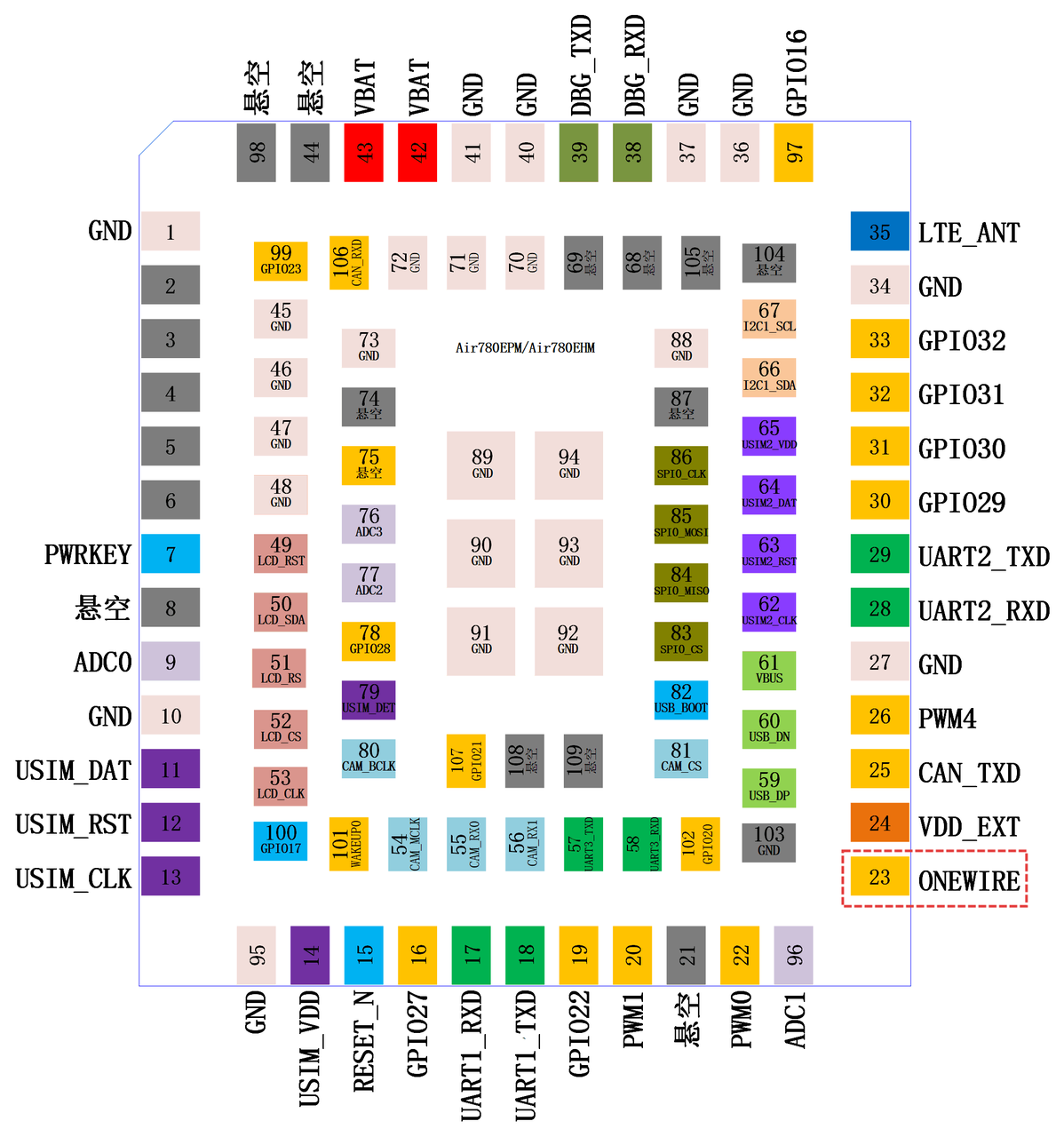
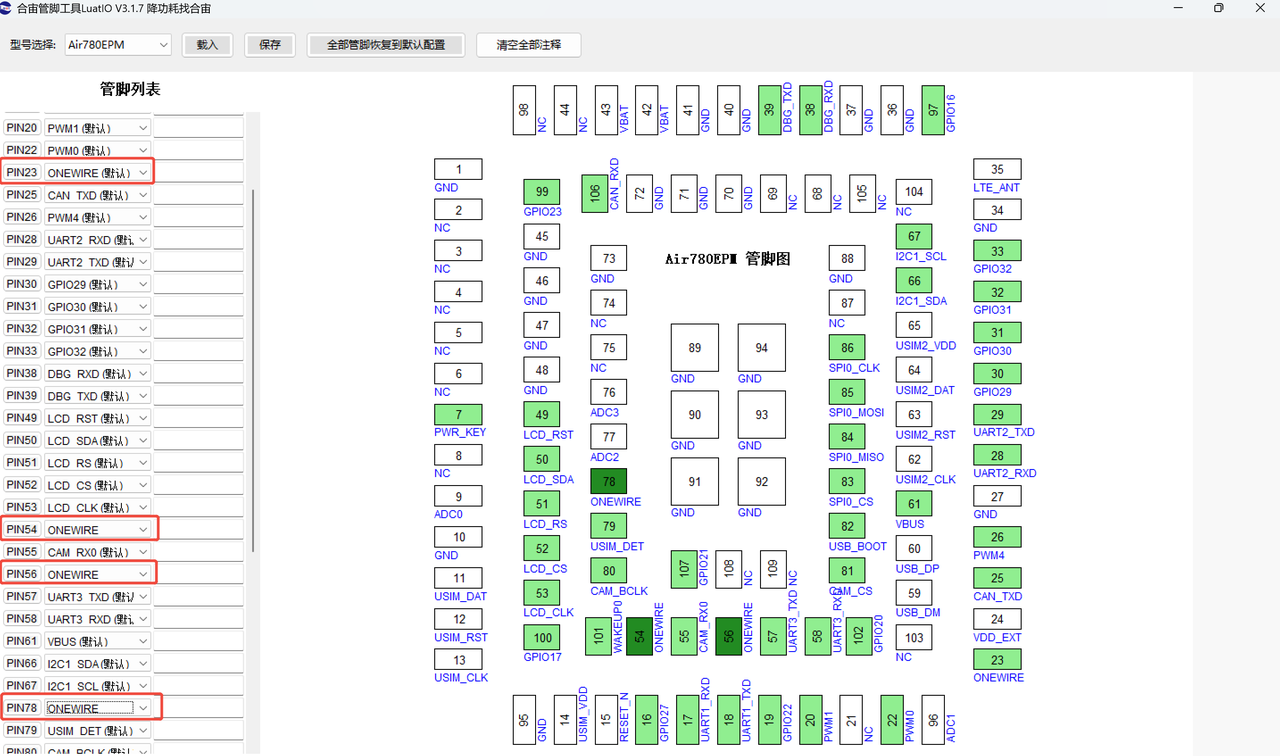
1、上面管脚图中仅标注了一处 PIN23:ONEWIRE 通道,为Air780EPM的推荐默认ONEWIRE管脚,但Air780EPM实际上有四个管脚可以复用为ONEWIRE;

2、虽然Air780EPM有四个管脚可以复用为ONEWIRE,但内部硬件上只有一个通道,所以:
- 如果你的系统设计中只需要用到一路ONEWIRE,那么你可以在任何时间随意使用;
- 如果你的系统设计中需要用到多路ONEWIRE,那么你就需要分时操作了:打开1,关闭1;打开2,关闭2;打开...
3、ONEWIRE最经典的应用是驱动DSB1802,Air780Exx系列客户已量产并出货多款,可以放心使用;
4、如果系统设计时ONEWIRE接的是可插拔外设,建议加上TVS进行,以免被ESD打坏;
样品购买链接:SIM和GPIO用,DFN1006-2封装,AR3321P1LV,应能微-淘宝网
5、在使用任何一个管脚的ONEWIRE功能之前,都需要先使用LuatIO工具生成pins配置json文件,也就是对IO的初始化功能配置;
关于LuatIO功能的介绍,详见:LuatIO初始化配置工具 - common@air780epm - 合宙模组资料中心 ;
6、ONEWIRE相关LuatOS核心库 47 onewire - 合宙模组资料中心 ;
参考代码
-- 示例一
-- 初始化OneWire总线
onewire.init(0)  -- 初始化硬件单总线ID为0
-- 配置时序参数
onewire.timing(0, false, 0, 480, 70, 70, 410, 70, 10, 10, 15, 70)  -- DS18B20标准时序

-- 读取DS18B20温度(假设已知设备存在)
onewire.reset(0, true)  -- 复位总线并检测设备

-- 发送温度转换命令
onewire.tx(0, 0x44, false, false, false)  -- Convert T命令
sys.wait(750)  -- 等待转换完成(12位精度需要750ms)

-- 读取温度数据
onewire.reset(0, true)  -- 再次复位
onewire.tx(0, 0xBE, false, false, false)  -- Read Scratchpad命令
local succ, data = onewire.rx(0, 9, false, false, false)  -- 读取9字节数据

if succ and data and #data == 9 then
   -- 计算温度(简化的整数部分)
   local temp = data:byte(1) + (data:byte(2) * 256)
   if temp > 32767 then temp = temp - 65536 end  -- 处理负温度
   temp = temp * 0.0625  -- DS18B20的分辨率为0.0625°C
   log.info("温度", "读取成功", "温度:", temp, "°C")
end


-- 示例二
-- 初始化总线
onewire.init(0)  -- 初始化硬件单总线ID为0
onewire.timing(0, false, 0, 480, 70, 70, 410, 70, 10, 10, 15, 70)  -- DS18B20标准时序

-- 定义温度轮询函数
local function pollTemperature()
   -- 启动温度转换
   onewire.reset(0, true)  -- 复位总线
   onewire.tx(0, 0x44, false, false, false)  -- 发送Convert T命令给所有设备
   sys.wait(100)  -- 等待转换

   -- 读取温度(跳过ROM命令,读取第一个设备)
   onewire.reset(0, true)  -- 再次复位
   onewire.tx(0, 0xCC, false, false, false)  -- Skip ROM命令
   onewire.tx(0, 0xBE, false, false, false)  -- Read Scratchpad命令
   local succ, temp_data = onewire.rx(0, 2, false, false, false)  -- 读取2字节温度数据

   if succ and temp_data and #temp_data == 2 then
       local temp = temp_data:byte(1) + temp_data:byte(2) * 256
       if temp > 32767 then temp = temp - 65536 end
       temp = temp * 0.0625
       log.info("温度传感器", temp_data:toHex(), temp, "°C")
   end
end

-- 启动定时器轮询
sys.timerLoopStart(pollTemperature, 2000)  -- 每2秒轮询一次


-- 示例三
-- 初始化OneWire
onewire.init(0)  -- 初始化硬件单总线ID为0
onewire.timing(0, false, 0, 480, 70, 70, 410, 70, 10, 10, 15, 70)  -- DS18B20标准时序

-- 定义总线状态检查函数
local function checkBusStatus()
   -- 检查总线状态
   local present = onewire.reset(0, true)
   if present then
       log.info("OneWire", "总线正常,设备存在")

       -- 尝试读取设备ROM ID(使用Read ROM命令0x33)
       onewire.reset(0, true)  -- 复位
       onewire.tx(0, 0x33, false, false, false)  -- Read ROM命令
       local succ, rom_data = onewire.rx(0, 8, false, false, false)  -- 读取8字节ROM数据

       if succ and rom_data and #rom_data == 8 then
           log.info("设备ROM", rom_data:toHex())
       else
           log.warn("OneWire", "读取设备ROM失败")
       end
   else
       log.warn("OneWire", "总线异常,无设备响应")
   end
end

-- 启动状态监控定时器
sys.timerLoopStart(checkBusStatus, 5000)  -- 每5秒检查一次